
In this study we present the same case as in the Case study article, but translated to use the syntax of the dplyr package and friends.
The study is concise, emphasizing process over details. (Terminology and functions are described in detail in subsequent articles.) Here we emphasize how we work with longitudinal data and how midfieldr supports that process.
Description
We define the parameters of our case study as follows:
Data. Program CIP codes from midfieldr cip.
Student records from midfielddata student, term, and
degree.
Metric. Program stickiness: the ratio \small (S) of the number of graduates of a program \small (N_\textrm{grad}) to the number ever enrolled in the program \small (N_\textrm{ever}), including part-time students, migrators, transfers, and students admitted in any term (Ohland et al. 2012).
\small S = \frac{\small N_\textrm{grad}}{\small N_\textrm{ever}} = \frac{\small\mathrm{number\ of\ graduates\ of\ a\ program}}{\small\mathrm{number\ ever\ enrolled\ in\ the\ program}}
Programs. Civil, Electrical, Industrial/Systems, and Mechanical Engineering.
Records. Exclude records later than a student’s first degree term; filter for data sufficiency and degree seeking; no exclusions due to part-time status, transfer status, admission term, or starting program.
Population. The set of unique IDs from the above records.
Blocs. Students ever enrolled in the programs and timely graduates of the programs are required by the metric.
Groupings. We select program, race/ethnicity, and sex for grouping and summarizing.
Outcome. To calculate the metric, we construct a data frame with columns for each grouping variable (program, race/ethnicity, and sex) and the counts by group \small N_\textrm{grad} and \small N_\textrm{ever}.
Dissemination. Exclude groupings too small to preserve anonymity. Edit column names to suit the audience. Condition/transform data as needed for tables or charts.
If you are writing your own script to follow along, we use these packages in this article:
Programs
One can start an analysis with program data or with student record
data—the choice is arbitrary. We start with programs and set the results
aside until needed when constructing our blocs. Our goal in this section
is to search the CIP data table for the 6-digit codes for our programs.
The cip dataset loads with midfieldr.
Search for program codes
The cip dataset loads with midfieldr. For compatibility
with the dplyr syntax, we covert it to a tibble.
cip <- as_tibble(cip)Unless you already know your program CIP codes, finding them entails some trial and error.
filter_programs() searches cip for string
patterns. Searching for “civil engineering” yields programs in
Engineering that we want and some in Engineering Technology that we do
not.
filter_programs(cip, "civil engineering")
#> # A tibble: 8 × 6
#>   cip6name                                       cip6
#>   <chr>                                          <chr>
#> 1 Civil Engineering, General                     140801
#> 2 Geotechnical Engineering                       140802
#> 3 Structural Engineering                         140803
#> 4 Transportation and Highway Engineering         140804
#> 5 Water Resources Engineering                    140805
#> 6 Civil Engineering, Other                       140899
#> 7 Civil Engineering Technology, Technician       150201
#> 8 Civil Drafting and Civil Engineering CAD, CADD 151304
#>   cip4name                                               cip4
#>   <chr>                                                  <chr>
#> 1 Civil Engineering                                      1408
#> 2 Civil Engineering                                      1408
#> 3 Civil Engineering                                      1408
#> 4 Civil Engineering                                      1408
#> 5 Civil Engineering                                      1408
#> 6 Civil Engineering                                      1408
#> 7 Civil Engineering Technologies, Technicians            1502
#> 8 Drafting, Design Engineering Technologies, Technicians 1513
#>   cip2name               cip2
#>   <chr>                  <chr>
#> 1 Engineering            14
#> 2 Engineering            14
#> 3 Engineering            14
#> 4 Engineering            14
#> 5 Engineering            14
#> 6 Engineering            14
#> 7 Engineering Technology 15
#> 8 Engineering Technology 15
These results suggest that Engineering has the 2-digit code “14” and
that Civil Engineering has the 4-digit code “1408”. We can extract Civil
Engineering alone by searching cip for lines that start
with “1408”, yielding six 6-digit codes. Regular expressions such as
“^1408” are accepted.
cip |>
  filter_programs("^1408")
#> # A tibble: 6 × 6
#>   cip6name                               cip6   cip4name          cip4
#>   <chr>                                  <chr>  <chr>             <chr>
#> 1 Civil Engineering, General             140801 Civil Engineering 1408
#> 2 Geotechnical Engineering               140802 Civil Engineering 1408
#> 3 Structural Engineering                 140803 Civil Engineering 1408
#> 4 Transportation and Highway Engineering 140804 Civil Engineering 1408
#> 5 Water Resources Engineering            140805 Civil Engineering 1408
#> 6 Civil Engineering, Other               140899 Civil Engineering 1408
#>   cip2name    cip2
#>   <chr>       <chr>
#> 1 Engineering 14
#> 2 Engineering 14
#> 3 Engineering 14
#> 4 Engineering 14
#> 5 Engineering 14
#> 6 Engineering 14
Knowing the 2-digit code for Engineering programs, our next search is
for lines that start with “14”. The result is an Engineering subset of
cip with 54 rows.
cip |>
  filter_programs("^14")
#> # A tibble: 54 × 6
#>    cip6name                                                     cip6
#>    <chr>                                                        <chr>
#>  1 Engineering, General                                         140101
#>  2 Pre-Engineering                                              140102
#>  3 Aerospace, Aeronautical and Astronautical, Space Engineering 140201
#>  4 Agricultural, Biological Engineering and Bioengineering      140301
#>  5 Architectural Engineering                                    140401
#>  6 Biomedical, Medical Engineering                              140501
#>  7 Ceramic Sciences and Engineering                             140601
#>  8 Chemical Engineering                                         140701
#>  9 Chemical and Biomolecular Engineering                        140702
#> 10 Chemical Engineering, Other                                  140799
#>    cip4name                                                cip4  cip2name
#>    <chr>                                                   <chr> <chr>
#>  1 Engineering, General                                    1401  Engineering
#>  2 Engineering, General                                    1401  Engineering
#>  3 Aerospace, Aeronautical and Astronautical Engineering   1402  Engineering
#>  4 Agricultural, Biological Engineering and Bioengineering 1403  Engineering
#>  5 Architectural Engineering                               1404  Engineering
#>  6 Biomedical, Medical Engineering                         1405  Engineering
#>  7 Ceramic Sciences and Engineering                        1406  Engineering
#>  8 Chemical Engineering                                    1407  Engineering
#>  9 Chemical Engineering                                    1407  Engineering
#> 10 Chemical Engineering                                    1407  Engineering
#>    cip2
#>    <chr>
#>  1 14
#>  2 14
#>  3 14
#>  4 14
#>  5 14
#>  6 14
#>  7 14
#>  8 14
#>  9 14
#> 10 14
#> # ℹ 44 more rows
Next, to search this result for Electrical Engineering, we assign
engr_cip to the cip argument, yielding four
6-digit codes.
cip |>
  filter_programs("^14") |>
  filter_programs("electrical")
#> # A tibble: 4 × 6
#>   cip6name                                                      cip6
#>   <chr>                                                         <chr>
#> 1 Electrical, Electronics and Communications Engineering        141001
#> 2 Laser and Optical Engineering                                 141003
#> 3 Telecommunications Engineering                                141004
#> 4 Electrical, Electronics and Communications Engineering, Other 141099
#>   cip4name                                               cip4  cip2name    cip2
#>   <chr>                                                  <chr> <chr>       <chr>
#> 1 Electrical, Electronics and Communications Engineering 1410  Engineering 14
#> 2 Electrical, Electronics and Communications Engineering 1410  Engineering 14
#> 3 Electrical, Electronics and Communications Engineering 1410  Engineering 14
#> 4 Electrical, Electronics and Communications Engineering 1410  Engineering 14
Continuing in a similar fashion, we find that our programs have the following 4-digit codes:
- Civil Engineering 1408
- Electrical Engineering 1410
- Mechanical Engineering 1419
- Industrial/Systems Engineering 1427, 1435, 1436, and 1437.
Construct the programs table
To collect all our 6-digit codes, we create a search string of the desired 4-digit codes. We drop all columns except the 6-digit names and 6-digit codes.
codes_we_want <- c("^1408", "^1410", "^1419", "^1427", "^1435", "^1436", "^1437")
programs <- cip |>
  filter_programs(codes_we_want) |>
  select(cip6name, cip6)

programs
#> # A tibble: 15 × 2
#>    cip6name                                                      cip6
#>    <chr>                                                         <chr>
#>  1 Civil Engineering, General                                    140801
#>  2 Geotechnical Engineering                                      140802
#>  3 Structural Engineering                                        140803
#>  4 Transportation and Highway Engineering                        140804
#>  5 Water Resources Engineering                                   140805
#>  6 Civil Engineering, Other                                      140899
#>  7 Electrical, Electronics and Communications Engineering        141001
#>  8 Laser and Optical Engineering                                 141003
#>  9 Telecommunications Engineering                                141004
#> 10 Electrical, Electronics and Communications Engineering, Other 141099
#> # ℹ 5 more rows
The program names in cip are usually too long for
effective use—user-defined names are nearly always required. So we add a
program variable with values “CE” (Civil Engineering), “EE”
(electrical), “ME” (Mechanical), and “ISE” (Industrial-Systems
Engineering). We also abbreviate a couple of terms for a slightly more
compact display.
programs <- programs |>
  mutate(program = case_when(
    grepl("^1408", cip6) ~ "CE",
    grepl("^1410", cip6) ~ "EE",
    grepl("^1419", cip6) ~ "ME",
    grepl("^1427|^1435|^1436|^1437", cip6) ~ "ISE"
  )) |>
  mutate(across(cip6name, \(x) str_replace(x, "Engineering", "Engng"))) |>
  mutate(across(cip6name, \(x) str_replace(x, "Communication", "Commn")))

programs
#> # A tibble: 15 × 3
#>    cip6name                                        cip6   program
#>    <chr>                                           <chr>  <chr>
#>  1 Civil Engng, General                            140801 CE
#>  2 Geotechnical Engng                              140802 CE
#>  3 Structural Engng                                140803 CE
#>  4 Transportation and Highway Engng                140804 CE
#>  5 Water Resources Engng                           140805 CE
#>  6 Civil Engng, Other                              140899 CE
#>  7 Electrical, Electronics and Commns Engng        141001 EE
#>  8 Laser and Optical Engng                         141003 EE
#>  9 Telecommunications Engng                        141004 EE
#> 10 Electrical, Electronics and Commns Engng, Other 141099 EE
#> # ℹ 5 more rows
Our programs data frame is complete: 15 six-digit codes are encoded
using 4 program labels. This data frame can sit in memory (or written to
file) until we’re ready to filter the blocs by program, joining data
frames by matching on the cip6 variable.
Records
For this study we load three of the midfielddata data tables. We convert these data frames to tibbles as well.
data(student, term, degree)

student <- as_tibble(student)
term <- as_tibble(term)
degree <- as_tibble(degree)
We usually copy the source data, giving them new names (and new
locations in memory), to keep them intact while we use the original
names — student, term, and degree
— to do our work. Unlike when using data.table, tibbles do not update by
reference.
student_source <- student
term_source <- term
degree_source <- degree
The working data frames student, term, and
degree should always be present in our computing
environment so we can take advantage of midfieldr default argument
values. For example, post_completion_terms() accesses the
degree table to do its work. If degree is in
the environment, the following lines yield the same results:
# not run
post_completion_terms(term, midf_table = degree)
post_completion_terms(term, degree)
post_completion_terms(term)
In this article, we use the latter form.
Select basic columns
Optional, but convenient for viewing data frames at intermediate stages. We reduce the number of columns to those required by other midfieldr functions plus the key or composite key variables of the data tables.
student <- select_basic_cols(student)
term <- select_basic_cols(term)
degree <- select_basic_cols(degree)
look_at() is a midfieldr convenience function that wraps
base::str().
look_at(student)
#> tibble [97,555 × 3] (S3: tbl_df/tbl/data.frame)
#>  $ mcid: chr  "MCID3111142225" "MCID3111142283" "MCID3111142290" "MCID3111142"..
#>  $ race: chr  "Asian" "Asian" "Asian" "Asian" ...
#>  $ sex : chr  "Male" "Female" "Male" "Male" ...

look_at(term)
#> tibble [639,915 × 5] (S3: tbl_df/tbl/data.frame)
#>  $ mcid       : chr  "MCID3111142225" "MCID3111142283" "MCID3111142283" "MCID"..
#>  $ term       : chr  "19881" "19881" "19883" "19885" ...
#>  $ cip6       : chr  "140901" "240102" "240102" "190601" ...
#>  $ institution: chr  "Institution B" "Institution J" "Institution J" "Institu"..
#>  $ level      : chr  "01 First-year" "01 First-year" "01 First-year" "01 Firs"..

look_at(degree)
#> tibble [49,665 × 3] (S3: tbl_df/tbl/data.frame)
#>  $ mcid       : chr  "MCID3111142225" "MCID3111142290" "MCID3111142294" "MCID"..
#>  $ term_degree: chr  "19881" "19921" "19903" "19921" ...
#>  $ cip6       : chr  "141001" "141001" "141001" "141001" ...
class(student)
#> [1] "tbl_df"     "tbl"        "data.frame"

x <- student

class(x)
#> [1] "tbl_df"     "tbl"        "data.frame"

y <- as.data.frame(x)
class(y)
#> [1] "data.frame"
data.table::setattr(y, "class", c("tbl_df", "tbl", "data.frame"))
class(y)
#> [1] "tbl_df"     "tbl"        "data.frame"

y
#> # A tibble: 97,555 × 3
#>    mcid           race     sex
#>    <chr>          <chr>    <chr>
#>  1 MCID3111142225 Asian    Male
#>  2 MCID3111142283 Asian    Female
#>  3 MCID3111142290 Asian    Male
#>  4 MCID3111142294 Asian    Male
#>  5 MCID3111142299 Asian    Male
#>  6 MCID3111142303 Asian    Male
#>  7 MCID3111142633 Black    Male
#>  8 MCID3111142689 Hispanic Female
#>  9 MCID3111142729 Hispanic Male
#> 10 MCID3111142775 Hispanic Male
#> # ℹ 97,545 more rows

z <- y |> group_by(race)
class(z)
#> [1] "grouped_df" "tbl_df"     "tbl"        "data.frame"
z <- as.data.frame(z)
data.table::setattr(z, "class", c("tbl_df", "tbl", "data.frame"))
class(z)
#> [1] "tbl_df"     "tbl"        "data.frame"
Exclude post-baccalaureate terms
We are not generally interested in terms beyond the first degree term, so we identify and exclude terms later than the first degree term. Multiple degrees earned in the first degree term are retained, but any courses, terms, or degrees after the first baccalaureate are excluded.
post_completion_terms() adds a column of labels
indicating that a term belongs to one of three clusters: terms that are
prior to, equal to, or subsequent to the student’s first degree
term.
term <- post_completion_terms(term)
degree <- post_completion_terms(degree)

look_at(term)
#> tibble [639,915 × 7] (S3: tbl_df/tbl/data.frame)
#>  $ mcid             : chr  "MCID3111142225" "MCID3111142283" "MCID3111142283""..
#>  $ term             : chr  "19881" "19881" "19883" "19885" ...
#>  $ cip6             : chr  "140901" "240102" "240102" "190601" ...
#>  $ institution      : chr  "Institution B" "Institution J" "Institution J" "I"..
#>  $ level            : chr  "01 First-year" "01 First-year" "01 First-year" "0"..
#>  $ first_degree_term: chr  "19881" NA NA NA ...
#>  $ term_cluster     : chr  "first-degree" "pre-degree" "pre-degree" "pre-degr"..

look_at(degree)
#> tibble [49,665 × 5] (S3: tbl_df/tbl/data.frame)
#>  $ mcid             : chr  "MCID3111142225" "MCID3111142290" "MCID3111142294""..
#>  $ term_degree      : chr  "19881" "19921" "19903" "19921" ...
#>  $ cip6             : chr  "141001" "141001" "141001" "141001" ...
#>  $ first_degree_term: chr  "19881" "19921" "19903" "19921" ...
#>  $ term_cluster     : chr  "first-degree" "first-degree" "first-degree" "firs"..
To quickly assess the relative size of the three clusters, we count
observations by the term_cluster variable.
term |>
  group_by(term_cluster) |>
  tally() |>
  arrange(desc(n))
#> # A tibble: 3 × 2
#>   term_cluster           n
#>   <chr>              <int>
#> 1 pre-degree        598477
#> 2 first-degree       34440
#> 3 post-first-degree   6998

degree |>
  group_by(term_cluster) |>
  tally() |>
  arrange(desc(n))
#> # A tibble: 2 × 2
#>   term_cluster          n
#>   <chr>             <int>
#> 1 first-degree      49618
#> 2 post-first-degree    47
We exclude the rows labeled “post-first-degree.” This step does not
apply to the student table because it contains no term
information.
term <- term |>
  filter(term_cluster != "post-first-degree")

degree <- degree |>
  filter(term_cluster != "post-first-degree")
We can drop the added columns by applying
select_basic_cols() again.
term <- select_basic_cols(term)
degree <- select_basic_cols(degree)

look_at(term)
#> tibble [632,917 × 5] (S3: tbl_df/tbl/data.frame)
#>  $ mcid       : chr  "MCID3111142225" "MCID3111142283" "MCID3111142283" "MCID"..
#>  $ term       : chr  "19881" "19881" "19883" "19885" ...
#>  $ cip6       : chr  "140901" "240102" "240102" "190601" ...
#>  $ institution: chr  "Institution B" "Institution J" "Institution J" "Institu"..
#>  $ level      : chr  "01 First-year" "01 First-year" "01 First-year" "01 Firs"..

look_at(degree)
#> tibble [49,618 × 3] (S3: tbl_df/tbl/data.frame)
#>  $ mcid       : chr  "MCID3111142225" "MCID3111142290" "MCID3111142294" "MCID"..
#>  $ term_degree: chr  "19881" "19921" "19903" "19921" ...
#>  $ cip6       : chr  "141001" "141001" "141001" "141001" ...
Filter for data sufficiency
The next few steps are easier to follow if we start with the unique IDs from our current term table as our draft population. We filter these IDs for data sufficiency and degree-seeking, then filter the records to retain those IDs only.
DT <- term |>
  select(mcid) |>
  unique()
DT
#> # A tibble: 97,536 × 1
#>    mcid
#>    <chr>
#>  1 MCID3111142225
#>  2 MCID3111142283
#>  3 MCID3111142290
#>  4 MCID3111142294
#>  5 MCID3111142299
#>  6 MCID3111142303
#>  7 MCID3111142633
#>  8 MCID3111142689
#>  9 MCID3111142729
#> 10 MCID3111142775
#> # ℹ 97,526 more rows
The data sufficiency criterion limits student records to those for which available data are sufficient to credibly assess timely completion. To make that assessment, we need the last term in which a student’s degree completion would be considered timely—in many cases, 6 years after admission.
timely_term() adds a column of timely completion terms,
encoded YYYYT.
DT <- timely_term(DT)
DT
#> # A tibble: 97,536 × 5
#>    mcid           term_i level_i       adj_span timely_term
#>    <chr>          <chr>  <chr>            <dbl> <chr>
#>  1 MCID3111142225 19881  01 First-year        6 19933
#>  2 MCID3111142283 19881  01 First-year        6 19933
#>  3 MCID3111142290 19881  01 First-year        6 19933
#>  4 MCID3111142294 19881  01 First-year        6 19933
#>  5 MCID3111142299 19881  01 First-year        6 19933
#>  6 MCID3111142303 19881  01 First-year        6 19933
#>  7 MCID3111142633 19881  01 First-year        6 19933
#>  8 MCID3111142689 19883  01 First-year        6 19941
#>  9 MCID3111142729 19881  01 First-year        6 19933
#> 10 MCID3111142775 19881  01 First-year        6 19933
#> # ℹ 97,526 more rows
data_sufficiency() (which requires the
timely_term column) adds a column of labels indicating that
a student ID should be included (or excluded) because for that student,
the institution’s data range satisfies (or does not satisfy) the data
sufficiency criteria.
DT <- data_sufficiency(DT)
DT
#> # A tibble: 97,536 × 7
#>    mcid           term_i level_i       adj_span timely_term data_range
#>    <chr>          <chr>  <chr>            <dbl> <chr>       <chr>
#>  1 MCID3111142225 19881  01 First-year        6 19933       19881-20181
#>  2 MCID3111142283 19881  01 First-year        6 19933       19881-20096
#>  3 MCID3111142290 19881  01 First-year        6 19933       19881-20096
#>  4 MCID3111142294 19881  01 First-year        6 19933       19881-20096
#>  5 MCID3111142299 19881  01 First-year        6 19933       19881-20096
#>  6 MCID3111142303 19881  01 First-year        6 19933       19881-20096
#>  7 MCID3111142633 19881  01 First-year        6 19933       19881-20096
#>  8 MCID3111142689 19883  01 First-year        6 19941       19881-20181
#>  9 MCID3111142729 19881  01 First-year        6 19933       19881-20181
#> 10 MCID3111142775 19881  01 First-year        6 19933       19881-20096
#>    data_sufficiency
#>    <chr>
#>  1 exclude-lower
#>  2 exclude-lower
#>  3 exclude-lower
#>  4 exclude-lower
#>  5 exclude-lower
#>  6 exclude-lower
#>  7 exclude-lower
#>  8 include
#>  9 exclude-lower
#> 10 exclude-lower
#> # ℹ 97,526 more rows
Again, a quick assessment of the relative size of the three possible labels.
DT |>
  group_by(data_sufficiency) |>
  tally() |>
  arrange(desc(n))
#> # A tibble: 3 × 2
#>   data_sufficiency     n
#>   <chr>            <int>
#> 1 include          76865
#> 2 exclude-upper    17925
#> 3 exclude-lower     2746
We retain the rows labeled “include” for which we have sufficient data from the institution and retain the ID column only.
DT <- DT |>
  filter(data_sufficiency == "include") |>
  select(mcid)
DT
#> # A tibble: 76,865 × 1
#>    mcid
#>    <chr>
#>  1 MCID3111142689
#>  2 MCID3111142782
#>  3 MCID3111142881
#>  4 MCID3111142884
#>  5 MCID3111142893
#>  6 MCID3111142962
#>  7 MCID3111142965
#>  8 MCID3111143066
#>  9 MCID3111143068
#> 10 MCID3111143078
#> # ℹ 76,855 more rows
Filter for degree seeking
We require all students in our study to be degree-seeking. By design,
the student table contains only degree-seeking students. We
inner-join the ID column from the student table, matching
on mcid. In effect, the inner join filters our population
to remove any non-degree-seeking students.
DT <- inner_join(DT, student, by = join_by(mcid)) |>
  select(mcid)
DT
#> # A tibble: 76,865 × 1
#>    mcid
#>    <chr>
#>  1 MCID3111142689
#>  2 MCID3111142782
#>  3 MCID3111142881
#>  4 MCID3111142884
#>  5 MCID3111142893
#>  6 MCID3111142962
#>  7 MCID3111142965
#>  8 MCID3111143066
#>  9 MCID3111143068
#> 10 MCID3111143078
#> # ℹ 76,855 more rows
It happens that all students in this case are degree-seeking, so this step did not reduce the size of our population. (We include the step to illustrate our complete process.)
Finalize the records
The previous column of IDs is our baseline population.
population <- unique(DT)
population
#> # A tibble: 76,865 × 1
#>    mcid
#>    <chr>
#>  1 MCID3111142689
#>  2 MCID3111142782
#>  3 MCID3111142881
#>  4 MCID3111142884
#>  5 MCID3111142893
#>  6 MCID3111142962
#>  7 MCID3111142965
#>  8 MCID3111143066
#>  9 MCID3111143068
#> 10 MCID3111143078
#> # ℹ 76,855 more rows
We now filter the records to retain only those observations
associated with the IDs in our population data frame. We use inner joins
between population and student, term, and
degree to do so. Ensuring rows are unique yields the
baseline records in their final configuration.
student <- inner_join(student, population, by = join_by(mcid)) |>
  unique()
term <- inner_join(term, population, by = join_by(mcid)) |>
  unique()
degree <- inner_join(degree, population, by = join_by(mcid)) |>
  unique()
These three data frames are our final set of records on which all further analysis is based. We’ve reduced the number of unique students from 97,555 in the original source data to 76,865 that have met our several constraints.
look_at(student)
#> tibble [76,865 × 3] (S3: tbl_df/tbl/data.frame)
#>  $ mcid: chr  "MCID3111142689" "MCID3111142782" "MCID3111142881" "MCID3111142"..
#>  $ race: chr  "Hispanic" "Hispanic" "International" "International" ...
#>  $ sex : chr  "Female" "Female" "Male" "Male" ...

look_at(term)
#> tibble [525,446 × 5] (S3: tbl_df/tbl/data.frame)
#>  $ mcid       : chr  "MCID3111142689" "MCID3111142782" "MCID3111142782" "MCID"..
#>  $ term       : chr  "19883" "19883" "19885" "19893" ...
#>  $ cip6       : chr  "090401" "260101" "260101" "260101" ...
#>  $ institution: chr  "Institution B" "Institution J" "Institution J" "Institu"..
#>  $ level      : chr  "01 First-year" "01 First-year" "02 Second-year" "02 Sec"..

look_at(degree)
#> tibble [43,847 × 3] (S3: tbl_df/tbl/data.frame)
#>  $ mcid       : chr  "MCID3111142689" "MCID3111142782" "MCID3111142881" "MCID"..
#>  $ term_degree: chr  "19913" "19903" "19894" "19901" ...
#>  $ cip6       : chr  "090401" "260101" "450601" "141001" ...
Blocs and groupings
The work up to this point is applicable to most studies. In summary, we have configured our:
-
programs6-digit program codes, names, and custom labels -
student, term,anddegreerecords with post-baccalaureate terms removed and filtered for data sufficiency and degree seeking -
populationthe unique IDs in these records
The next steps depend on the metric and the groupings we assigned at the beginning. The stickiness metric requires these blocs:
- students with timely completion from the study programs
- students ever enrolled in these programs
And we selected these groupings:
- program
- race/ethnicity
- sex
We have a lot of flexibility in the order in which we construct our blocs and groupings, so what follows is only one of several effective solutions. Our approach here is to construct a bloc, filter by program, join the demographics, and repeat for the next bloc.
Timely graduates
We start with the baseline population. Like we did with the original
source data files, we copy it to protect population from
“by reference” changes.
DT <- population
DT
#> # A tibble: 76,865 × 1
#>    mcid
#>    <chr>
#>  1 MCID3111142689
#>  2 MCID3111142782
#>  3 MCID3111142881
#>  4 MCID3111142884
#>  5 MCID3111142893
#>  6 MCID3111142962
#>  7 MCID3111142965
#>  8 MCID3111143066
#>  9 MCID3111143068
#> 10 MCID3111143078
#> # ℹ 76,855 more rows
Filter for timely completion
We want to retain timely graduates, so first we add the timely completion term (the same term we used for determining data sufficiency) to our population then apply the completion status function.
completion_status() adds a column of labels indicating
that program completion was timely, late, or NA (for
non-completers).
DT <- DT |>
  timely_term() |>
  completion_status()
DT
#> # A tibble: 76,865 × 7
#>    mcid           term_i level_i       adj_span timely_term completion_term
#>    <chr>          <chr>  <chr>            <dbl> <chr>       <chr>
#>  1 MCID3111142689 19883  01 First-year        6 19941       19913
#>  2 MCID3111142782 19883  01 First-year        6 19941       19903
#>  3 MCID3111142881 19893  01 First-year        6 19951       19894
#>  4 MCID3111142884 19883  01 First-year        6 19941       NA
#>  5 MCID3111142893 19883  01 First-year        6 19941       NA
#>  6 MCID3111142962 19883  01 First-year        6 19941       NA
#>  7 MCID3111142965 19883  01 First-year        6 19941       19901
#>  8 MCID3111143066 19883  01 First-year        6 19941       19883
#>  9 MCID3111143068 19891  01 First-year        6 19943       19903
#> 10 MCID3111143078 19883  01 First-year        6 19941       19891
#>    completion_status
#>    <chr>
#>  1 timely
#>  2 timely
#>  3 timely
#>  4 NA
#>  5 NA
#>  6 NA
#>  7 timely
#>  8 timely
#>  9 timely
#> 10 timely
#> # ℹ 76,855 more rows
Another brief assessment. Here we compare the relative size of the three possible status labels.
DT |>
  group_by(completion_status) |>
  tally() |>
  arrange(desc(n))
#> # A tibble: 3 × 2
#>   completion_status     n
#>   <chr>             <int>
#> 1 timely            40430
#> 2 NA                33089
#> 3 late               3346
We retain the rows labeled “timely” and the drop all the columns except the ID column.
DT <- DT |>
  filter(completion_status == "timely") |>
  select(mcid)
DT
#> # A tibble: 40,430 × 1
#>    mcid
#>    <chr>
#>  1 MCID3111142689
#>  2 MCID3111142782
#>  3 MCID3111142881
#>  4 MCID3111142965
#>  5 MCID3111143066
#>  6 MCID3111143068
#>  7 MCID3111143078
#>  8 MCID3111143126
#>  9 MCID3111143157
#> 10 MCID3111144047
#> # ℹ 40,420 more rows
Filter by program
We left-join the CIP column from the degree table,
matching on mcid. That we increase the number of rows
indicates that some students have more than one degree in their first
degree term.
degree_cols <- degree |>
  select(mcid, cip6)
DT <- left_join(DT, degree_cols, by = join_by(mcid))
DT
#> # A tibble: 40,490 × 2
#>    mcid           cip6
#>    <chr>          <chr>
#>  1 MCID3111142689 090401
#>  2 MCID3111142782 260101
#>  3 MCID3111142881 450601
#>  4 MCID3111142965 141001
#>  5 MCID3111143066 090401
#>  6 MCID3111143068 520201
#>  7 MCID3111143078 040401
#>  8 MCID3111143126 090401
#>  9 MCID3111143157 261399
#> 10 MCID3111144047 230101
#> # ℹ 40,480 more rows
Now we use an inner-join with our programs data frame,
matching on cip6, to retain only those students who
complete one of our study programs. We retain the program
column and drop the cip6 column.
programs_cols <- programs |>
  select(cip6, program)
DT <- inner_join(DT, programs_cols, by = join_by(cip6)) |>
  select(-cip6)
DT
#> # A tibble: 3,263 × 2
#>    mcid           program
#>    <chr>          <chr>
#>  1 MCID3111142965 EE
#>  2 MCID3111145102 EE
#>  3 MCID3111146537 EE
#>  4 MCID3111146674 EE
#>  5 MCID3111150194 ISE
#>  6 MCID3111151029 ME
#>  7 MCID3111156062 CE
#>  8 MCID3111156083 EE
#>  9 MCID3111156325 EE
#> 10 MCID3111158221 ISE
#> # ℹ 3,253 more rows
Another brief assessment. Here we compare the relative numbers of program graduates.
Join demographics
To add columns for student demographics, we left-join selected
columns from the student table, matching on
mcid.
student_cols <- student |>
  select(mcid, race, sex)
DT <- left_join(DT, student_cols, by = join_by(mcid))
DT
#> # A tibble: 3,263 × 4
#>    mcid           program race          sex
#>    <chr>          <chr>   <chr>         <chr>
#>  1 MCID3111142965 EE      International Male
#>  2 MCID3111145102 EE      White         Male
#>  3 MCID3111146537 EE      Asian         Female
#>  4 MCID3111146674 EE      Asian         Male
#>  5 MCID3111150194 ISE     Black         Male
#>  6 MCID3111151029 ME      International Male
#>  7 MCID3111156062 CE      White         Male
#>  8 MCID3111156083 EE      White         Male
#>  9 MCID3111156325 EE      White         Female
#> 10 MCID3111158221 ISE     White         Female
#> # ℹ 3,253 more rows
Bloc of timely graduates
This is the bloc of timely graduates required by our metric. We add a
bloc variable with the value “grad” and ensure we have
unique rows.
graduates <- DT |>
  mutate(bloc = "grad") |>
  unique()

graduates
#> # A tibble: 3,263 × 5
#>    mcid           program race          sex    bloc
#>    <chr>          <chr>   <chr>         <chr>  <chr>
#>  1 MCID3111142965 EE      International Male   grad
#>  2 MCID3111145102 EE      White         Male   grad
#>  3 MCID3111146537 EE      Asian         Female grad
#>  4 MCID3111146674 EE      Asian         Male   grad
#>  5 MCID3111150194 ISE     Black         Male   grad
#>  6 MCID3111151029 ME      International Male   grad
#>  7 MCID3111156062 CE      White         Male   grad
#>  8 MCID3111156083 EE      White         Male   grad
#>  9 MCID3111156325 EE      White         Female grad
#> 10 MCID3111158221 ISE     White         Female grad
#> # ℹ 3,253 more rows
Ever enrolled
Again we start with the baseline population.
DT <- population
DT
#> # A tibble: 76,865 × 1
#>    mcid
#>    <chr>
#>  1 MCID3111142689
#>  2 MCID3111142782
#>  3 MCID3111142881
#>  4 MCID3111142884
#>  5 MCID3111142893
#>  6 MCID3111142962
#>  7 MCID3111142965
#>  8 MCID3111143066
#>  9 MCID3111143068
#> 10 MCID3111143078
#> # ℹ 76,855 more rows
Filter by program
We left-join the CIP column from the term table,
matching on mcid.
term_cols <- term |>
  select(mcid, cip6) |>
  unique()
DT <- left_join(DT, term_cols, by = join_by(mcid))
DT
#> # A tibble: 126,168 × 2
#>    mcid           cip6
#>    <chr>          <chr>
#>  1 MCID3111142689 090401
#>  2 MCID3111142782 260101
#>  3 MCID3111142881 450601
#>  4 MCID3111142884 260406
#>  5 MCID3111142893 400801
#>  6 MCID3111142962 240102
#>  7 MCID3111142962 520201
#>  8 MCID3111142965 140102
#>  9 MCID3111142965 141001
#> 10 MCID3111143066 090401
#> # ℹ 126,158 more rows
We repeat the process we used earlier to inner-join our
programs data frame, matching on cip6.
programs_cols <- programs |>
  select(cip6, program)
DT <- inner_join(DT, programs_cols, by = join_by(cip6)) |>
  select(-cip6)
DT
#> # A tibble: 5,583 × 2
#>    mcid           program
#>    <chr>          <chr>
#>  1 MCID3111142965 EE
#>  2 MCID3111145102 EE
#>  3 MCID3111146537 EE
#>  4 MCID3111146674 EE
#>  5 MCID3111150194 ISE
#>  6 MCID3111151029 ME
#>  7 MCID3111156062 CE
#>  8 MCID3111156083 EE
#>  9 MCID3111156325 EE
#> 10 MCID3111158221 ISE
#> # ℹ 5,573 more rows
With the CIP code removed, we filter for unique rows. This is an important step because a student may switch CIP codes yet stay within a program as defined by our custom labels. We want to avoid counting that student as ever-enrolled more than once.
DT <- unique(DT)
DT
#> # A tibble: 5,583 × 2
#>    mcid           program
#>    <chr>          <chr>
#>  1 MCID3111142965 EE
#>  2 MCID3111145102 EE
#>  3 MCID3111146537 EE
#>  4 MCID3111146674 EE
#>  5 MCID3111150194 ISE
#>  6 MCID3111151029 ME
#>  7 MCID3111156062 CE
#>  8 MCID3111156083 EE
#>  9 MCID3111156325 EE
#> 10 MCID3111158221 ISE
#> # ℹ 5,573 more rows
Another brief assessment. Here we compare the relative numbers of students ever enrolled in our programs.
Join demographics
Again, we left-join selected columns from the student
table, matching on mcid.
student_cols <- student |>
  select(mcid, race, sex)
DT <- left_join(DT, student_cols, by = join_by(mcid))
DT
#> # A tibble: 5,583 × 4
#>    mcid           program race          sex
#>    <chr>          <chr>   <chr>         <chr>
#>  1 MCID3111142965 EE      International Male
#>  2 MCID3111145102 EE      White         Male
#>  3 MCID3111146537 EE      Asian         Female
#>  4 MCID3111146674 EE      Asian         Male
#>  5 MCID3111150194 ISE     Black         Male
#>  6 MCID3111151029 ME      International Male
#>  7 MCID3111156062 CE      White         Male
#>  8 MCID3111156083 EE      White         Male
#>  9 MCID3111156325 EE      White         Female
#> 10 MCID3111158221 ISE     White         Female
#> # ℹ 5,573 more rows
Bloc of ever-enrolled
This is the bloc of students ever enrolled in our programs required
by our metric. We add a bloc variable with the value “ever”
and ensure we have unique rows.
ever_enrolled <- DT |>
  mutate(bloc = "ever") |>
  unique()

ever_enrolled
#> # A tibble: 5,583 × 5
#>    mcid           program race          sex    bloc
#>    <chr>          <chr>   <chr>         <chr>  <chr>
#>  1 MCID3111142965 EE      International Male   ever
#>  2 MCID3111145102 EE      White         Male   ever
#>  3 MCID3111146537 EE      Asian         Female ever
#>  4 MCID3111146674 EE      Asian         Male   ever
#>  5 MCID3111150194 ISE     Black         Male   ever
#>  6 MCID3111151029 ME      International Male   ever
#>  7 MCID3111156062 CE      White         Male   ever
#>  8 MCID3111156083 EE      White         Male   ever
#>  9 MCID3111156325 EE      White         Female ever
#> 10 MCID3111158221 ISE     White         Female ever
#> # ℹ 5,573 more rows
Outcomes
Combining the two data frames (blocs) by rows, we obtain the data structure we need for grouping and summarizing.
DT <- bind_rows(graduates, ever_enrolled)
DT
#> # A tibble: 8,846 × 5
#>    mcid           program race          sex    bloc
#>    <chr>          <chr>   <chr>         <chr>  <chr>
#>  1 MCID3111142965 EE      International Male   grad
#>  2 MCID3111145102 EE      White         Male   grad
#>  3 MCID3111146537 EE      Asian         Female grad
#>  4 MCID3111146674 EE      Asian         Male   grad
#>  5 MCID3111150194 ISE     Black         Male   grad
#>  6 MCID3111151029 ME      International Male   grad
#>  7 MCID3111156062 CE      White         Male   grad
#>  8 MCID3111156083 EE      White         Male   grad
#>  9 MCID3111156325 EE      White         Female grad
#> 10 MCID3111158221 ISE     White         Female grad
#> # ℹ 8,836 more rows
Group and summarize
Count the numbers of observations for each combination of the grouping variables.
DT <- DT %>%
  count(bloc, program, race, sex, name = "N")
DT
#> # A tibble: 98 × 5
#>    bloc  program race            sex        N
#>    <chr> <chr>   <chr>           <chr>  <int>
#>  1 ever  CE      Asian           Female    14
#>  2 ever  CE      Asian           Male      30
#>  3 ever  CE      Black           Female     4
#>  4 ever  CE      Black           Male       8
#>  5 ever  CE      Hispanic        Female    13
#>  6 ever  CE      Hispanic        Male      66
#>  7 ever  CE      International   Female    23
#>  8 ever  CE      International   Male      97
#>  9 ever  CE      Native American Female     1
#> 10 ever  CE      Native American Male       3
#> # ℹ 88 more rows
Reshape
Reshaping the data frame to calculate the metric.
Transform from block-record form to row-record form. The
N column values are moved to two new columns,
ever and grad, one for each bloc, leaving the
grouping variables (program, race/ethnicity, and sex) in place. This
operation is known by a number of different names, e.g., pivot,
crosstab, unstack, spread, or widen (Mount and Zumel
2019). The result has the data structure we called out in our
project description for calculating the metric.
DT <- DT |>
  pivot_wider(
    names_from = bloc,
    values_from = N,
    values_fill = 0
  )
DT
#> # A tibble: 50 × 5
#>    program race            sex     ever  grad
#>    <chr>   <chr>           <chr>  <int> <int>
#>  1 CE      Asian           Female    14    10
#>  2 CE      Asian           Male      30    25
#>  3 CE      Black           Female     4     1
#>  4 CE      Black           Male       8     5
#>  5 CE      Hispanic        Female    13     6
#>  6 CE      Hispanic        Male      66    31
#>  7 CE      International   Female    23    13
#>  8 CE      International   Male      97    55
#>  9 CE      Native American Female     1     1
#> 10 CE      Native American Male       3     1
#> # ℹ 40 more rows
Calculate the metric
Completes the initial analysis.
Stickiness is the ratio of the number of graduates to the number ever enrolled, expressed as a percentage. Stickiness is calculated for each combination of program, race/ethnicity, and sex.
DT <- DT |>
  mutate(stickiness = round(100 * grad / ever, 1))
DT
#> # A tibble: 50 × 6
#>    program race            sex     ever  grad stickiness
#>    <chr>   <chr>           <chr>  <int> <int>      <dbl>
#>  1 CE      Asian           Female    14    10       71.4
#>  2 CE      Asian           Male      30    25       83.3
#>  3 CE      Black           Female     4     1       25
#>  4 CE      Black           Male       8     5       62.5
#>  5 CE      Hispanic        Female    13     6       46.2
#>  6 CE      Hispanic        Male      66    31       47
#>  7 CE      International   Female    23    13       56.5
#>  8 CE      International   Male      97    55       56.7
#>  9 CE      Native American Female     1     1      100
#> 10 CE      Native American Male       3     1       33.3
#> # ℹ 40 more rows
Dissemination
We take several additional steps before disseminating these results.
To preserve the anonymity of the people involved, we remove observations with \small N or fewer observations. When dealing with the full MIDFIELD research data, we typically use \small N = 10, but for these practice data we illustrate the procedure using \small N = 3.
DT <- DT |>
  filter(grad > 3)
DT
#> # A tibble: 37 × 6
#>    program race          sex     ever  grad stickiness
#>    <chr>   <chr>         <chr>  <int> <int>      <dbl>
#>  1 CE      Asian         Female    14    10       71.4
#>  2 CE      Asian         Male      30    25       83.3
#>  3 CE      Black         Male       8     5       62.5
#>  4 CE      Hispanic      Female    13     6       46.2
#>  5 CE      Hispanic      Male      66    31       47
#>  6 CE      International Female    23    13       56.5
#>  7 CE      International Male      97    55       56.7
#>  8 CE      Other/Unknown Male      27    11       40.7
#>  9 CE      White         Female   260   162       62.3
#> 10 CE      White         Male     943   612       64.9
#> # ℹ 27 more rows
We have found it useful to report such data with a variable that combines race/ethnicity and sex.
DT <- DT |>
  mutate(people = paste(race, sex)) |>
  select(program, race, sex, people, everything())
DT
#> # A tibble: 37 × 7
#>    program race          sex    people                ever  grad stickiness
#>    <chr>   <chr>         <chr>  <chr>                <int> <int>      <dbl>
#>  1 CE      Asian         Female Asian Female            14    10       71.4
#>  2 CE      Asian         Male   Asian Male              30    25       83.3
#>  3 CE      Black         Male   Black Male               8     5       62.5
#>  4 CE      Hispanic      Female Hispanic Female         13     6       46.2
#>  5 CE      Hispanic      Male   Hispanic Male           66    31       47
#>  6 CE      International Female International Female    23    13       56.5
#>  7 CE      International Male   International Male      97    55       56.7
#>  8 CE      Other/Unknown Male   Other/Unknown Male      27    11       40.7
#>  9 CE      White         Female White Female           260   162       62.3
#> 10 CE      White         Male   White Male             943   612       64.9
#> # ℹ 27 more rows
Readers can more readily interpret our charts and tables if the programs are unabbreviated.
DT <- DT |>
  mutate(program = case_when(
    program == "CE" ~ "Civil",
    program == "EE" ~ "Electrical",
    program == "ME" ~ "Mechanical",
    program == "ISE" ~ "Industrial"
  ))
DT
#> # A tibble: 37 × 7
#>    program race          sex    people                ever  grad stickiness
#>    <chr>   <chr>         <chr>  <chr>                <int> <int>      <dbl>
#>  1 Civil   Asian         Female Asian Female            14    10       71.4
#>  2 Civil   Asian         Male   Asian Male              30    25       83.3
#>  3 Civil   Black         Male   Black Male               8     5       62.5
#>  4 Civil   Hispanic      Female Hispanic Female         13     6       46.2
#>  5 Civil   Hispanic      Male   Hispanic Male           66    31       47
#>  6 Civil   International Female International Female    23    13       56.5
#>  7 Civil   International Male   International Male      97    55       56.7
#>  8 Civil   Other/Unknown Male   Other/Unknown Male      27    11       40.7
#>  9 Civil   White         Female White Female           260   162       62.3
#> 10 Civil   White         Male   White Male             943   612       64.9
#> # ℹ 27 more rows
Table
Omit columns that won’t appear in the table.
DT_table <- DT |>
  select(program, people, stickiness)
DT_table
#> # A tibble: 37 × 3
#>    program people               stickiness
#>    <chr>   <chr>                     <dbl>
#>  1 Civil   Asian Female               71.4
#>  2 Civil   Asian Male                 83.3
#>  3 Civil   Black Male                 62.5
#>  4 Civil   Hispanic Female            46.2
#>  5 Civil   Hispanic Male              47
#>  6 Civil   International Female       56.5
#>  7 Civil   International Male         56.7
#>  8 Civil   Other/Unknown Male         40.7
#>  9 Civil   White Female               62.3
#> 10 Civil   White Male                 64.9
#> # ℹ 27 more rows
Transform the data from block-records to row-records with one row per “people” category (race/ethnicity/sex grouping).
DT_table <- DT_table |>
  pivot_wider(
    names_from = program,
    values_from = stickiness,
    values_fill = NA
  ) |>
  arrange(people) |>
  rename(People = people)
DT_table
#> # A tibble: 12 × 5
#>    People               Civil Electrical Industrial Mechanical
#>    <chr>                <dbl>      <dbl>      <dbl>      <dbl>
#>  1 Asian Female          71.4       57.1       66.7       NA
#>  2 Asian Male            83.3       58.2       66.7       64.5
#>  3 Black Female          NA         NA         85.7       NA
#>  4 Black Male            62.5       58.6       66.7       65.5
#>  5 Hispanic Female       46.2       NA         NA         66.7
#>  6 Hispanic Male         47         38.6       66.7       53.8
#>  7 International Female  56.5       33.3       NA         57.9
#>  8 International Male    56.7       46.4       57.1       50.6
#>  9 Other/Unknown Female  NA         NA         NA         50
#> 10 Other/Unknown Male    40.7       40         NA         51.2
#> # ℹ 2 more rows
Format the table for publication.
library(gt)
DT_table |>
  gt() |>
  tab_caption("Table 1. Engineering program stickiness (%)") |>
  tab_options(table.font.size = "small") |>
  opt_stylize(style = 1, color = "gray") |>
  tab_style(
    style = list(cell_fill(color = "#c7eae5")),
    locations = cells_column_labels(columns = everything())
)| People | Civil | Electrical | Industrial | Mechanical |
|---|---|---|---|---|
| Asian Female | 71.4 | 57.1 | 66.7 | NA |
| Asian Male | 83.3 | 58.2 | 66.7 | 64.5 |
| Black Female | NA | NA | 85.7 | NA |
| Black Male | 62.5 | 58.6 | 66.7 | 65.5 |
| Hispanic Female | 46.2 | NA | NA | 66.7 |
| Hispanic Male | 47.0 | 38.6 | 66.7 | 53.8 |
| International Female | 56.5 | 33.3 | NA | 57.9 |
| International Male | 56.7 | 46.4 | 57.1 | 50.6 |
| Other/Unknown Female | NA | NA | NA | 50.0 |
| Other/Unknown Male | 40.7 | 40.0 | NA | 51.2 |
| White Female | 62.3 | 47.9 | 74.0 | 63.2 |
| White Male | 64.9 | 52.0 | 73.0 | 60.1 |
Chart
To use ggplot(), we want the data in its block-record
form.
DT_chart <- DT
DT_chart
#> # A tibble: 37 × 7
#>    program race          sex    people                ever  grad stickiness
#>    <chr>   <chr>         <chr>  <chr>                <int> <int>      <dbl>
#>  1 Civil   Asian         Female Asian Female            14    10       71.4
#>  2 Civil   Asian         Male   Asian Male              30    25       83.3
#>  3 Civil   Black         Male   Black Male               8     5       62.5
#>  4 Civil   Hispanic      Female Hispanic Female         13     6       46.2
#>  5 Civil   Hispanic      Male   Hispanic Male           66    31       47
#>  6 Civil   International Female International Female    23    13       56.5
#>  7 Civil   International Male   International Male      97    55       56.7
#>  8 Civil   Other/Unknown Male   Other/Unknown Male      27    11       40.7
#>  9 Civil   White         Female White Female           260   162       62.3
#> 10 Civil   White         Male   White Male             943   612       64.9
#> # ℹ 27 more rows
With one quantitative variable (stickiness) for every combination of the levels of two categorical variables (program and people), these are multiway data (Cleveland 1993). How one orders the categorical variables is critical for visualizing effects.
order_multiway() converts the two categorical variables
to ordered factors to support the ordering of rows and panels in the
chart. The calculated stickiness values by group—which determine the
ordering—are added in new columns.
DT_chart <- order_multiway(DT_chart,
  quantity = "stickiness",
  categories = c("program", "people"),
  method = "percent",
  ratio_of = c("grad", "ever")
)
DT_chart
#> # A tibble: 37 × 9
#>    program race          sex    people                ever  grad stickiness
#>    <fct>   <chr>         <chr>  <fct>                <dbl> <dbl>      <dbl>
#>  1 Civil   Asian         Female Asian Female            14    10       71.4
#>  2 Civil   Asian         Male   Asian Male              30    25       83.3
#>  3 Civil   Black         Male   Black Male               8     5       62.5
#>  4 Civil   Hispanic      Female Hispanic Female         13     6       46.2
#>  5 Civil   Hispanic      Male   Hispanic Male           66    31       47
#>  6 Civil   International Female International Female    23    13       56.5
#>  7 Civil   International Male   International Male      97    55       56.7
#>  8 Civil   Other/Unknown Male   Other/Unknown Male      27    11       40.7
#>  9 Civil   White         Female White Female           260   162       62.3
#> 10 Civil   White         Male   White Male             943   612       64.9
#>    program_metric people_metric
#>             <dbl>         <dbl>
#>  1           62.8          64
#>  2           62.8          63.9
#>  3           62.8          62.7
#>  4           62.8          56
#>  5           62.8          48.5
#>  6           62.8          47.8
#>  7           62.8          50.4
#>  8           62.8          46.3
#>  9           62.8          61.3
#> 10           62.8          60.1
#> # ℹ 27 more rows
Format the chart for publication.
library(ggplot2)
ggplot(DT_chart, aes(x = stickiness, y = people)) +
  facet_wrap(vars(program),
    ncol = 1,
    as.table = FALSE
  ) +
  geom_vline(aes(xintercept = program_metric),
    linetype = 2,
    color = "gray60"
  ) +
  geom_point(size = 1.8) +
  labs(x = "Stickiness (%)", y = "") +
  theme_light(base_size = 10)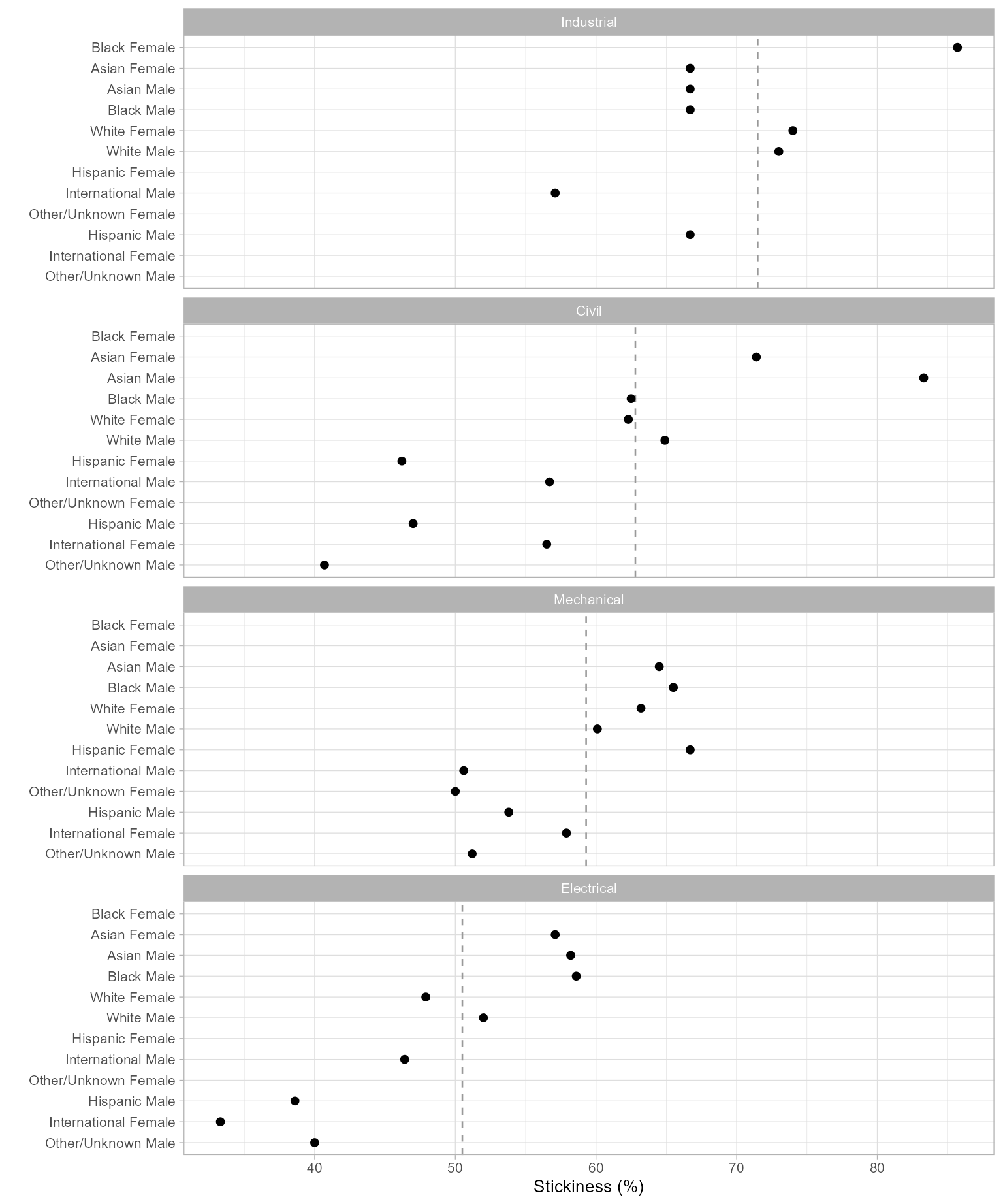
Figure 1: Program stickiness.