
Stickiness is a more-inclusive alternative to graduation rate as a measure of a program’s success in attracting, keeping, and graduating their undergraduates. Students excluded by a conventional graduation rate metric–including migrators—are included in the stickiness metric (Ohland et al., 2012).
An inclusive metric
Program stickiness \small(S) is the ratio of the number of graduates of a program \small(N_g) to the number ever enrolled in the program \small(N_e).
S = \frac{N_g}{N_e}
Stickiness, in comparison to graduation rate, has these characteristics:
Includes migrators, where graduation rate does not.
Is based on the bloc of ever enrolled rather than starters, so there is no need for FYE proxies.
Counts all graduates (timely completers) in a program, eliminating the need to filter graduates based on their starting program.
Like the MIDFIELD definition of graduation rate (in contrast to the IPEDS definition), includes students who attend college part-time, who transfer between institutions, and who start in any term.
As they pertain to the stickiness metric, relationships among starters, migrators, and graduates (timely completers) of a given program P are illustrated in Figure 1.
The overall rectangle represents the stickiness denominator (N_e), the number of students ever enrolled in program P, including starters and migrators.
The interior rectangle represents the stickiness numerator (N_g), the number of graduates (timely completers) of program P.
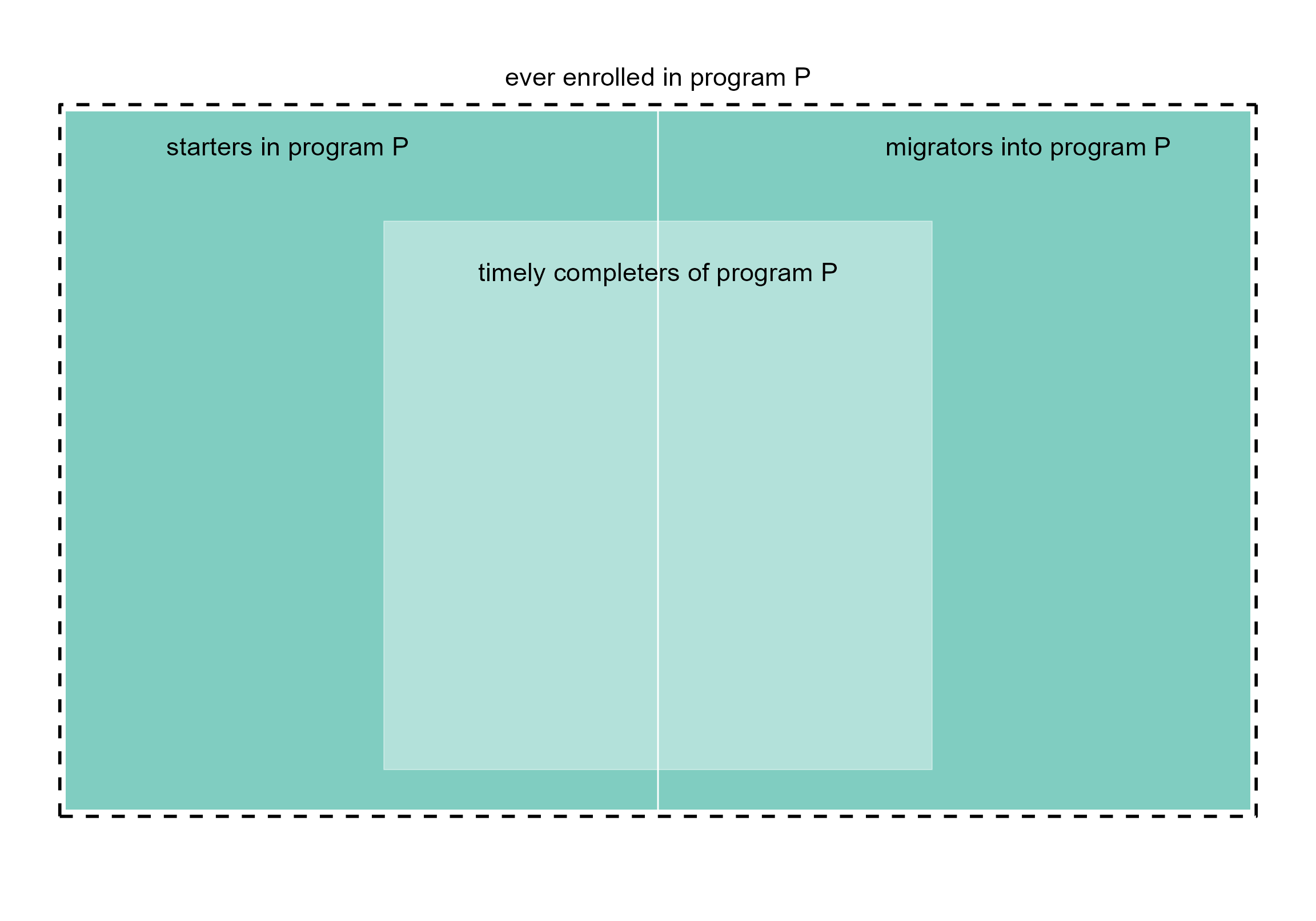
Figure 1. Stickiness metric. Starters, migrators, and timely completers.
Application
In our Case study, we construct the two major blocs required to calculate stickiness—the numbers of graduates \small(N_g) and ever-enrolled \small(N_e).
Rather than duplicate the complete case, we pick it up at an
intermediate step just before grouping and summarizing. Those data load
with midfieldr as case_blocs.
library("midfieldr")
library("data.table")

DT <- copy(case_blocs)
DT
#>                 mcid program       people   bloc
#>               <char>  <char>       <char> <char>
#>    1: MCID3111287755      CE Asian Female   ever
#>    2: MCID3111379307      CE Asian Female   ever
#>    3: MCID3111394108      CE Asian Female   ever
#>   ---
#> 8866: MCID3112610409      ME   White Male   grad
#> 8867: MCID3112618976      ME   White Male   grad
#> 8868: MCID3112641535      ME   White Male   grad
Group and summarize
Count the numbers of observations for each combination of the grouping variables. Convert the count from integer to double format.
DT <- DT[, .(N = as.double(.N)), by = c("program", "people", "bloc")]
DT
#>     program             people   bloc     N
#>      <char>             <char> <char> <num>
#>  1:      CE       Asian Female   ever    14
#>  2:      CE         Asian Male   ever    33
#>  3:      CE       Black Female   ever     4
#> ---
#> 96:      ME Other/Unknown Male   grad    41
#> 97:      ME       White Female   grad   134
#> 98:      ME         White Male   grad   952
Reshape
We want to separate the \small N column into two columns—one for the number of graduates and the other for the number of ever enrolled. This operation is known by a number of different names, e.g., pivot, crosstab, unstack, spread, or widen (Mount & Zumel, 2019).
The data.table package uses dcast() for this operation.
The key columns program and people remain in
place. The bloc column yields the new key columns
ever and grad with values taken from the
N column.
DT <- dcast(DT,
  program + people ~ bloc,
  value.var = "N",
  drop = FALSE, # keep all combinations
  fill = NA_real_ # NA if no value
)
setkey(DT, NULL)
DT
#>     program                 people  ever  grad
#>      <char>                 <char> <num> <num>
#>  1:      CE           Asian Female    14    10
#>  2:      CE             Asian Male    33    25
#>  3:      CE           Black Female     4     1
#>  4:      CE             Black Male     8     5
#>  5:      CE        Hispanic Female    13     6
#>  6:      CE          Hispanic Male    66    31
#>  7:      CE   International Female    23    13
#>  8:      CE     International Male    98    55
#>  9:      CE Native American Female     1     1
#> 10:      CE   Native American Male     3     1
#> 11:      CE   Other/Unknown Female     5     3
#> 12:      CE     Other/Unknown Male    27    11
#> 13:      CE           White Female   261   162
#> 14:      CE             White Male   948   612
#> ---
#> 43:      ME           Asian Female     7     1
#> 44:      ME             Asian Male    77    49
#> 45:      ME           Black Female     3     2
#> 46:      ME             Black Male    29    19
#> 47:      ME        Hispanic Female    12     8
#> 48:      ME          Hispanic Male    78    42
#> 49:      ME   International Female    20    11
#> 50:      ME     International Male   176    89
#> 51:      ME Native American Female    NA    NA
#> 52:      ME   Native American Male     5     1
#> 53:      ME   Other/Unknown Female     8     4
#> 54:      ME     Other/Unknown Male    81    41
#> 55:      ME           White Female   213   134
#> 56:      ME             White Male  1587   952
Calculate the metric
Before calculating the metric, we address possible “divide by zero”
errors by converting any zero values of ever to NA. Not
required in this case, but included for completeness.
DT[ever == 0, ever := NA_real_]Stickiness is calculated for each combination of program and people.
DT[, stick := round(100 * grad / ever, 1)]
DT
#> Index: <ever>
#>     program                 people  ever  grad stick
#>      <char>                 <char> <num> <num> <num>
#>  1:      CE           Asian Female    14    10  71.4
#>  2:      CE             Asian Male    33    25  75.8
#>  3:      CE           Black Female     4     1  25.0
#>  4:      CE             Black Male     8     5  62.5
#>  5:      CE        Hispanic Female    13     6  46.2
#>  6:      CE          Hispanic Male    66    31  47.0
#>  7:      CE   International Female    23    13  56.5
#>  8:      CE     International Male    98    55  56.1
#>  9:      CE Native American Female     1     1 100.0
#> 10:      CE   Native American Male     3     1  33.3
#> 11:      CE   Other/Unknown Female     5     3  60.0
#> 12:      CE     Other/Unknown Male    27    11  40.7
#> 13:      CE           White Female   261   162  62.1
#> 14:      CE             White Male   948   612  64.6
#> ---
#> 43:      ME           Asian Female     7     1  14.3
#> 44:      ME             Asian Male    77    49  63.6
#> 45:      ME           Black Female     3     2  66.7
#> 46:      ME             Black Male    29    19  65.5
#> 47:      ME        Hispanic Female    12     8  66.7
#> 48:      ME          Hispanic Male    78    42  53.8
#> 49:      ME   International Female    20    11  55.0
#> 50:      ME     International Male   176    89  50.6
#> 51:      ME Native American Female    NA    NA    NA
#> 52:      ME   Native American Male     5     1  20.0
#> 53:      ME   Other/Unknown Female     8     4  50.0
#> 54:      ME     Other/Unknown Male    81    41  50.6
#> 55:      ME           White Female   213   134  62.9
#> 56:      ME             White Male  1587   952  60.0
We plot a subset of the results below for a quick overview of its range and distribution. For charts better designed for making comparisons, see the Case study.
library("ggplot2")
dframe <- DT[grad > 10, group := paste(people, program)]
dframe <- na.omit(dframe)
ggplot(dframe, aes(x = stick, y = reorder(group, stick))) +
  geom_point(size = 1.8, na.rm = TRUE) +
  labs(x = "Stickiness (%)", y = "") +
  theme_light(base_size = 10)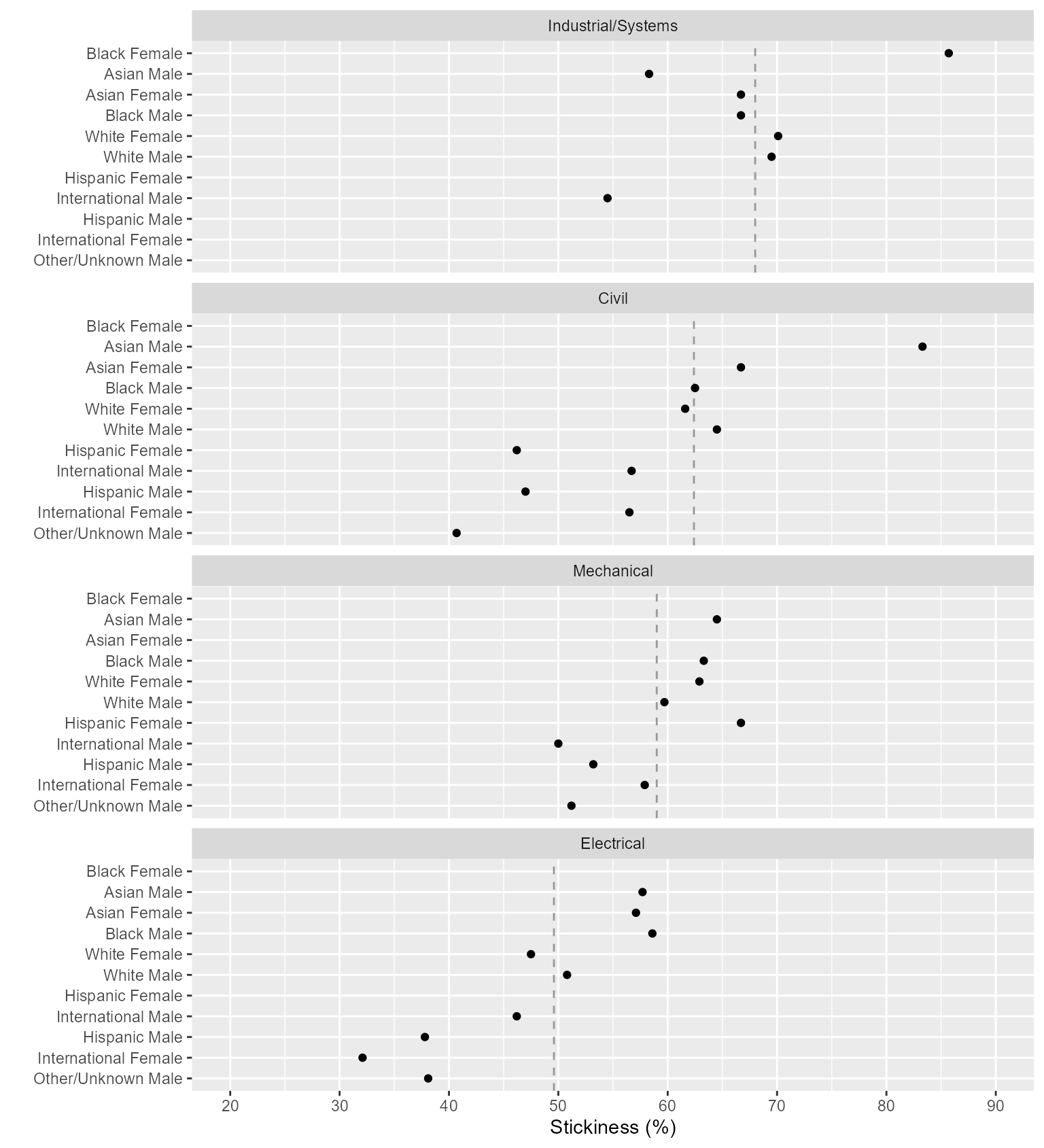
Figure 2: Stickiness overview