
Introduction
We illustrate how to work with longitudinal student records using midfieldr, focusing on the overall process and leaving detailed explanations of the coding to subsequent articles. The work is organized in three major topics:
- Obtaining a credible population and filtering the records to match.
- Manipulating the data to produce the desired metric and groupings.
- Conditioning the results for dissemination in tables and charts.
Scope
Data. Student records student, term, and
degree from midfielddata and program codes cip
from midfieldr.
Population. The IDs of degree-seeking students whose institutional data-ranges satisfy the data sufficiency requirement.
Records. Data filtered to match the population and focused on undergraduate terms.
Programs. Four Engineering majors: Civil, Electrical, Industrial/Systems, and Mechanical.
Quantitative metric. Program stickiness, the ratio \small (S) of the number of graduates of a program \small (N_\textrm{grad}) to the number ever enrolled in the program \small (N_\textrm{ever}).
\small S = \frac{\small N_\textrm{grad}}{\small N_\textrm{ever}} = \frac{\small\mathrm{number\ of\ graduates\ of\ a\ program}}{\small\mathrm{number\ ever\ enrolled\ in\ the\ program}}
Blocs. The metric requires two blocs: students ever enrolled in the programs; and timely graduates of the programs.
Groupings. Group the findings by program, race/ethnicity, and sex.
Dissemination. Exclude groupings too small to preserve anonymity; condition or transform data as needed for tables or charts.
Getting started
Packages used in this article:
library("midfieldr") # working with student records
library("midfielddata") # practice data
library("data.table") # data manipulation
library("gt") # tables
library("ggplot2") # charts
We load three of the midfielddata data tables.
data(student, term, degree)We copy the tables, giving them new names (suffix
_source) and new locations in memory. We can then use the
original names without inadvertently updating the source tables “by
reference” (Reference Semantics,
2026).
For comparing results as we subset the data, we start with the following number of rows in the original data frames.
| Table | Original tables |
|---|---|
| student | 97,555 |
| term | 639,915 |
| degree | 49,665 |
Population
The baseline population used for most studies consists of degree-seeking students whose records satisfy the data sufficiency requirement.
Degree-seeking
By design, the student data table contains all (and
only) degree-seeking students. Thus we start with those IDs.
DT <- student[, .(mcid)]
DT
#>                  mcid
#>                <char>
#>     1: MCID3111142225
#>     2: MCID3111142283
#>     3: MCID3111142290
#>    ---
#> 97553: MCID3112898894
#> 97554: MCID3112898895
#> 97555: MCID3112898940
Data sufficiency
We use timely_term() to determine the timely completion
term for the degree-seeking students and add columns to the data frame
to support those findings.
DT <- timely_term(DT, midf_table = term)
DT[order(entry_level)]
#>                  mcid entry_term    entry_level adj_span timely_term
#>                <char>     <char>         <char>    <num>      <char>
#>     1: MCID3111142225      19881  01 First-year        6       19933
#>     2: MCID3111142283      19881  01 First-year        6       19933
#>     3: MCID3111142290      19881  01 First-year        6       19933
#>    ---
#> 97553: MCID3111858641      20013  03 Third-year        4       20051
#> 97554: MCID3111860641      20013  03 Third-year        4       20051
#> 97555: MCID3111602161      19991 04 Fourth-year        3       20013
When displaying an intermediate result like this one, we often order the rows to illustrate some feature of the result. Here, for example, we order rows by entry level which determines the adjusted span that leads to the timely completion term.
We can reduce the number of columns to just those we need and use
data_sufficiency() to identify records that pass or fail
the data sufficiency test. The added columns support the findings.
DT <- DT[, .(mcid, entry_term, timely_term)]
DT <- data_sufficiency(DT, midf_table = term)
DT[order(-sufficiency)]
#>                  mcid entry_term timely_term  data_range sufficiency
#>                <char>     <char>      <char>      <char>      <char>
#>     1: MCID3111142689      19883       19941 19881-20181   satisfied
#>     2: MCID3111142782      19883       19941 19881-20096   satisfied
#>     3: MCID3111142881      19893       19951 19881-20181   satisfied
#>    ---
#> 97553: MCID3111824139      19901       19953 19901-20154  fail-lower
#> 97554: MCID3111869416      19901       19953 19901-20154  fail-lower
#> 97555: MCID3112056754      19881       19933 19881-20096  fail-lower
Summary check. A brief credibility check by summarizing the numbers of students in each category.
DT[, .N, by = c("sufficiency")][order(-N)]
#>    sufficiency     N
#>         <char> <int>
#> 1:   satisfied 76875
#> 2:  fail-upper 17934
#> 3:  fail-lower  2746
Retain rows labeled “satisfied” and drop all but the ID column. This set of IDs is our baseline population.
population <- DT[sufficiency == "satisfied", .(mcid)]
population
#>                  mcid
#>                <char>
#>     1: MCID3111142689
#>     2: MCID3111142782
#>     3: MCID3111142881
#>    ---
#> 76873: MCID3112785480
#> 76874: MCID3112800920
#> 76875: MCID3112870009
Records
To obtain our baseline records, we exclude students not in our population and we exclude terms that are post-baccalaureate.
Filter for population
An inner join of the population data frame and each data table,
matching on mcid, excludes IDs not in our population.
student <- population[student, on = "mcid", nomatch = NULL]
term <- population[term, on = "mcid", nomatch = NULL]
degree <- population[degree, on = "mcid", nomatch = NULL]| Table | Original tables | Population filter |
|---|---|---|
| student | 97,555 | 76,875 |
| term | 639,915 | 531,419 |
| degree | 49,665 | 43,903 |
Filter for undergraduate terms
We are interested in undergraduate records: academic terms
before a student’s first degree. We use pre_or_post_bacc()
to differentiate between undergraduate terms and post-baccalaureate
terms.
term <- pre_or_post_bacc(term, midf_table = degree)
degree <- pre_or_post_bacc(degree, midf_table = degree)
Summary check. Number of students in each category.
term[, .N, by = c("pre_or_post")][order(-N)]
#>    pre_or_post      N
#>         <char>  <int>
#> 1:    pre-bacc 525446
#> 2:   post-bacc   5973

degree[, .N, by = c("pre_or_post")][order(-N)]
#>    pre_or_post     N
#>         <char> <int>
#> 1:    pre-bacc 43857
#> 2:   post-bacc    46
Retain rows labeled “undergrad” and drop the extra columns.
term <- term[pre_or_post == "pre-bacc"]
degree <- degree[pre_or_post == "pre-bacc"]

term[, c("bacc_term", "pre_or_post") := NULL]
degree[, c("bacc_term", "pre_or_post") := NULL]
We copy the current data tables to reserve them as our “baseline”
records. From this point forward, anytime we need a fresh copy of any of
the data tables, we copy the *_baseline version. Anytime we
need a starting population, we copy population.
| Table | Original tables | Population filter | Undergrad filter |
|---|---|---|---|
| student | 97,555 | 76,875 | 76,875 |
| term | 639,915 | 531,419 | 525,446 |
| degree | 49,665 | 43,903 | 43,857 |
Review the baseline records. look_at() is a midfieldr
convenience function that wraps base::str() using our
preferred arguments.
look_at(student_baseline)
#> Classes 'data.table' and 'data.frame':   76875 obs. of  13 variables:
#>  $ mcid          : chr  "MCID3111142689" "MCID3111142782" "MCID3111142881" "M"..
#>  $ race          : chr  "Hispanic" "Hispanic" "International" "International" ..
#>  $ sex           : chr  "Female" "Female" "Male" "Male" ...
#>  $ institution   : chr  "Institution B" "Institution J" "Institution B" "Inst"..
#>  $ transfer      : chr  "First-Time Transfer" "First-Time Transfer" "First-Ti"..
#>  $ hours_transfer: num  NA NA NA NA NA NA NA NA NA NA ...
#>  $ age_desc      : chr  "Under 25" "Under 25" "25 and Older" "Under 25" ...
#>  $ us_citizen    : chr  "Yes" "Yes" "Yes" "No" ...
#>  $ home_zip      : chr  NA "22101" NA NA ...
#>  $ high_school   : chr  NA "471395" NA NA ...
#>  $ sat_math      : num  NA 520 NA NA NA NA NA NA NA NA ...
#>  $ sat_verbal    : num  NA 490 NA NA NA NA NA NA NA NA ...
#>  $ act_comp      : num  NA NA NA NA NA NA NA NA NA NA ...

look_at(term_baseline)
#> Classes 'data.table' and 'data.frame':   525446 obs. of  13 variables:
#>  $ mcid               : chr  "MCID3111142689" "MCID3111142782" "MCID311114278"..
#>  $ term               : chr  "19883" "19883" "19885" "19893" ...
#>  $ cip6               : chr  "090401" "260101" "260101" "260101" ...
#>  $ institution        : chr  "Institution B" "Institution J" "Institution J" "..
#>  $ level              : chr  "01 First-year" "01 First-year" "02 Second-year""..
#>  $ standing           : chr  "Good Standing" "Good Standing" "Good Standing" "..
#>  $ coop               : chr  "No" "No" "No" "No" ...
#>  $ hours_term         : num  9 16 4 13 4 4 10 9 18 6 ...
#>  $ hours_term_attempt : num  9 16 4 13 4 4 10 9 18 6 ...
#>  $ hours_cumul        : num  18 26 30 56 60 64 74 83 21 27 ...
#>  $ hours_cumul_attempt: num  18 26 30 56 60 64 74 83 21 27 ...
#>  $ gpa_term           : num  3.33 2.8 3 2.84 4 3.25 2.26 2.43 2.55 2.15 ...
#>  $ gpa_cumul          : num  3.05 2.57 2.63 2.53 2.63 2.67 2.61 2.59 2.76 2.62..

look_at(degree_baseline)
#> Classes 'data.table' and 'data.frame':   43857 obs. of  5 variables:
#>  $ mcid       : chr  "MCID3111142689" "MCID3111142782" "MCID3111142881" "MCID"..
#>  $ term_degree: chr  "19913" "19903" "19894" "19901" ...
#>  $ cip6       : chr  "090401" "260101" "450601" "141001" ...
#>  $ institution: chr  "Institution B" "Institution J" "Institution B" "Institu"..
#>  $ degree     : chr  "Bachelor of Arts in Journalism" "Bachelor of Science in"..

look_at(population)
#> Classes 'data.table' and 'data.frame':   76875 obs. of  1 variable:
#>  $ mcid: chr  "MCID3111142689" "MCID3111142782" "MCID3111142881" "MCID3111142"..
Blocs and groupings
With blocs and groupings we start narrowing our data from the general to the case-specific. We would usually start by copying the baseline tables, e.g.,
student <- copy(student_baseline)but in this particular script the baseline tables were created in the
code chunk just above, so we know our working data tables
{student, term, degree} already have the desired
content.
From our scope of work, the stickiness metric requires two blocs:
- students (timely) graduating from the programs
- students ever enrolled in the programs
And we listed three groupings:
- program
- race/ethnicity
- sex
This is a convenient point to work on the programs, given their importance to both blocs and groupings.
Programs
In this section we search the cip dataset for the
6-digit codes for our case-study programs.
Search for program codes
filter_programs() searches dframe for
string patterns. Searching for “engineering” yields 2-digit CIP codes
14, 15, 29, and 51. From the program names, the 2-digit code we want is
14.
filter_programs(dframe = cip, pattern = "engineering")
#>                                                              cip6name   cip6
#>                                                                <char> <char>
#>   1:                                             Engineering, General 140101
#>   2:                                                  Pre-Engineering 140102
#>   3:     Aerospace, Aeronautical and Astronautical, Space Engineering 140201
#>   4:          Agricultural, Biological Engineering and Bioengineering 140301
#>   5:                                        Architectural Engineering 140401
#>   6:                                  Biomedical, Medical Engineering 140501
#>   7:                                 Ceramic Sciences and Engineering 140601
#>   8:                                             Chemical Engineering 140701
#>  ---
#> 112:                                               Engineering Design 151502
#> 113:                                                Packaging Science 151503
#> 114:                                Engineering-Related Fields, Other 151599
#> 115:                                                   Nanotechnology 151601
#> 116:             Engineering Related Technologies, Technicians, Other 159999
#> 117:                                       Combat Systems Engineering 290301
#> 118:                                            Engineering Acoustics 290303
#> 119: Assistive, Augmentative Technology and Rehabiliation Engineering 512312
#>                                                     cip4name   cip4
#>                                                       <char> <char>
#>   1:                                    Engineering, General   1401
#>   2:                                    Engineering, General   1401
#>   3:   Aerospace, Aeronautical and Astronautical Engineering   1402
#>   4: Agricultural, Biological Engineering and Bioengineering   1403
#>   5:                               Architectural Engineering   1404
#>   6:                         Biomedical, Medical Engineering   1405
#>   7:                        Ceramic Sciences and Engineering   1406
#>   8:                                    Chemical Engineering   1407
#>  ---
#> 112:                              Engineering-Related Fields   1515
#> 113:                              Engineering-Related Fields   1515
#> 114:                              Engineering-Related Fields   1515
#> 115:                                          Nanotechnology   1516
#> 116:    Engineering-Related Technologies, Technicians, Other   1599
#> 117:                               Military Applied Sciences   2903
#> 118:                               Military Applied Sciences   2903
#> 119:              Rehabilitation and Therapeutic Professions   5123
#>                                              cip2name   cip2
#>                                                <char> <char>
#>   1:                                      Engineering     14
#>   2:                                      Engineering     14
#>   3:                                      Engineering     14
#>   4:                                      Engineering     14
#>   5:                                      Engineering     14
#>   6:                                      Engineering     14
#>   7:                                      Engineering     14
#>   8:                                      Engineering     14
#>  ---
#> 112:                           Engineering Technology     15
#> 113:                           Engineering Technology     15
#> 114:                           Engineering Technology     15
#> 115:                           Engineering Technology     15
#> 116:                           Engineering Technology     15
#> 117:                            Military Technologies     29
#> 118:                            Military Technologies     29
#> 119: Health Professions and Related Clinical Sciences     51
Subset cip for the Engineering code that starts with 14.
To unclutter our printouts, we can drop the 2-digit name and code.
engr_cip <- filter_programs(cip, "^14")
engr_cip <- engr_cip[, !c("cip2name", "cip2")]
Search that result for “civil”. We find the Civil Engineering 4-digit code is 1408.
filter_programs(engr_cip, "civil")
#>                                  cip6name   cip6          cip4name   cip4
#>                                    <char> <char>            <char> <char>
#> 1:             Civil Engineering, General 140801 Civil Engineering   1408
#> 2:               Geotechnical Engineering 140802 Civil Engineering   1408
#> 3:                 Structural Engineering 140803 Civil Engineering   1408
#> 4: Transportation and Highway Engineering 140804 Civil Engineering   1408
#> 5:            Water Resources Engineering 140805 Civil Engineering   1408
#> 6:               Civil Engineering, Other 140899 Civil Engineering   1408
Repeat for “electrical” and obtain the 4-digit code 1410.
filter_programs(engr_cip, "electrical")
#>                                                         cip6name   cip6
#>                                                           <char> <char>
#> 1:        Electrical, Electronics and Communications Engineering 141001
#> 2:                                 Laser and Optical Engineering 141003
#> 3:                                Telecommunications Engineering 141004
#> 4: Electrical, Electronics and Communications Engineering, Other 141099
#>                                                  cip4name   cip4
#>                                                    <char> <char>
#> 1: Electrical, Electronics and Communications Engineering   1410
#> 2: Electrical, Electronics and Communications Engineering   1410
#> 3: Electrical, Electronics and Communications Engineering   1410
#> 4: Electrical, Electronics and Communications Engineering   1410
Continuing in a similar fashion, we find that our programs have the following 4-digit codes.
- Civil Engineering 1408
- Electrical Engineering 1410
- Mechanical Engineering 1419
- Industrial/Systems Engineering 1427, 1435, 1436, and 1437.
Construct the programs table
We create a character vector of all the desired 4-digit codes.
codes_we_want <- c("^1408", "^1410", "^1419", "^1427", "^1435", "^1436", "^1437")
programs <- filter_programs(engr_cip, codes_we_want)
programs
#>                                                          cip6name   cip6
#>                                                            <char> <char>
#>  1:                                    Civil Engineering, General 140801
#>  2:                                      Geotechnical Engineering 140802
#>  3:                                        Structural Engineering 140803
#>  4:                        Transportation and Highway Engineering 140804
#>  5:                                   Water Resources Engineering 140805
#>  6:                                      Civil Engineering, Other 140899
#>  7:        Electrical, Electronics and Communications Engineering 141001
#>  8:                                 Laser and Optical Engineering 141003
#>  9:                                Telecommunications Engineering 141004
#> 10: Electrical, Electronics and Communications Engineering, Other 141099
#> 11:                                        Mechanical Engineering 141901
#> 12:                                           Systems Engineering 142701
#> 13:                                        Industrial Engineering 143501
#> 14:                                     Manufacturing Engineering 143601
#> 15:                                           Operations Research 143701
#>                                                   cip4name   cip4
#>                                                     <char> <char>
#>  1:                                      Civil Engineering   1408
#>  2:                                      Civil Engineering   1408
#>  3:                                      Civil Engineering   1408
#>  4:                                      Civil Engineering   1408
#>  5:                                      Civil Engineering   1408
#>  6:                                      Civil Engineering   1408
#>  7: Electrical, Electronics and Communications Engineering   1410
#>  8: Electrical, Electronics and Communications Engineering   1410
#>  9: Electrical, Electronics and Communications Engineering   1410
#> 10: Electrical, Electronics and Communications Engineering   1410
#> 11:                                 Mechanical Engineering   1419
#> 12:                                    Systems Engineering   1427
#> 13:                                 Industrial Engineering   1435
#> 14:                              Manufacturing Engineering   1436
#> 15:                                    Operations Research   1437
The cip4name values are not quite what we want for
program identifiers. The Electrical Engineering name is inconveniently
long and the four programs that comprise Industrial/Systems Engineering
are not linked by name. We assign our own abbreviations to a
user-defined program variable.
programs[, program := fcase(
  cip6 %like% "^1408", "CE",
  cip6 %like% "^1410", "EE",
  cip6 %like% "^1419", "ME",
  cip6 %like% c("^1427|^1435|^1436|^1437"), "ISE",
  default = NA_character_
)]
In the student records, all program data is encoded using 6-digit codes, so we retain the 6-digit codes, the 6-digit names (for reference), and our program labels. We shorten the longer names for a less cluttered display.
programs <- programs[, .(cip6name, cip6, program)]
programs[, cip6name := gsub("Engineering", "Engng", cip6name)]
programs[, cip6name := gsub("Communications", "Commns", cip6name)]
programs[, cip6name := gsub("Electrical, Electronics", "Elec, Electr,", cip6name)]

programs
#>                                  cip6name   cip6 program
#>                                    <char> <char>  <char>
#>  1:                  Civil Engng, General 140801      CE
#>  2:                    Geotechnical Engng 140802      CE
#>  3:                      Structural Engng 140803      CE
#>  4:      Transportation and Highway Engng 140804      CE
#>  5:                 Water Resources Engng 140805      CE
#>  6:                    Civil Engng, Other 140899      CE
#>  7:        Elec, Electr, and Commns Engng 141001      EE
#>  8:               Laser and Optical Engng 141003      EE
#>  9:              Telecommunications Engng 141004      EE
#> 10: Elec, Electr, and Commns Engng, Other 141099      EE
#> 11:                      Mechanical Engng 141901      ME
#> 12:                         Systems Engng 142701     ISE
#> 13:                      Industrial Engng 143501     ISE
#> 14:                   Manufacturing Engng 143601     ISE
#> 15:                   Operations Research 143701     ISE
Our programs data frame is complete: 15 six-digit codes
labeled using four user-defined program abbreviations. This data frame
can sit in memory (or written to file) until we’re ready to join the
programs to our blocs, matching on cip6.
Timely graduates
We start with the baseline population. Like we did with the original
data files, we copy it to protect population from changes
by reference.
DT <- copy(population)
DT
#>                  mcid
#>                <char>
#>     1: MCID3111142689
#>     2: MCID3111142782
#>     3: MCID3111142881
#>    ---
#> 76873: MCID3112785480
#> 76874: MCID3112800920
#> 76875: MCID3112870009
Filter for timely completion
We want to retain timely graduates only. We start by obtaining the
timely completion term then selecting the variables we need to go
forward. The term table here is identical to
term_baseline.
DT <- timely_term(DT, midf_table = term)
DT <- DT[, .(mcid, timely_term)]
DT
#>                  mcid timely_term
#>                <char>      <char>
#>     1: MCID3111142689       19941
#>     2: MCID3111142782       19941
#>     3: MCID3111142881       19951
#>    ---
#> 76873: MCID3112785480       20123
#> 76874: MCID3112800920       20153
#> 76875: MCID3112870009       20003
completion_status() builds on the output from
timely_term() to label rows to indicate whether a student
completes a degree timely or late compared to their timely completion
term (or NA for non-completion). The degree table here is
identical to degree_baseline.
DT <- completion_status(DT, midf_table = degree)
DT
#>                  mcid timely_term bacc_term completion
#>                <char>      <char>    <char>     <char>
#>     1: MCID3111142689       19941     19913     timely
#>     2: MCID3111142782       19941     19903     timely
#>     3: MCID3111142881       19951     19894     timely
#>    ---
#> 76863: MCID3112785480       20123      <NA>       <NA>
#> 76864: MCID3112800920       20153      <NA>       <NA>
#> 76865: MCID3112870009       20003      <NA>       <NA>
Summary check. Numbers of students in each category.
DT[, .N, by = c("completion")][order(-completion)]
#>    completion     N
#>        <char> <int>
#> 1:     timely 40430
#> 2:       late  3346
#> 3:       <NA> 33089
We retain the rows labeled “timely”, drop all the columns except ID, and ensure unique rows.
DT <- DT[completion == "timely", .(mcid)]
DT <- unique(DT)
DT
#>                  mcid
#>                <char>
#>     1: MCID3111142689
#>     2: MCID3111142782
#>     3: MCID3111142881
#>    ---
#> 40428: MCID3112692944
#> 40429: MCID3112694738
#> 40430: MCID3112730841
Filter by program
We left-join the CIP column from the baseline degree
table, matching on mcid.
degree_cip <- degree[, .(mcid, cip6)]
DT <- degree_cip[DT, on = "mcid"]
DT
#>                  mcid   cip6
#>                <char> <char>
#>     1: MCID3111142689 090401
#>     2: MCID3111142782 260101
#>     3: MCID3111142881 450601
#>    ---
#> 40488: MCID3112692944 090101
#> 40489: MCID3112694738 230101
#> 40490: MCID3112730841 040401
Summary check. That the number of rows above has increased from 40,430 to 40,490 indicates that some students have more than one degree in their first degree term. To check, we count how many students completed \small N degrees.
x <- DT[, .(N_degrees = .N), by = "mcid"]
x[, .(N_students = .N), by = "N_degrees"][order(N_degrees)]
#>    N_degrees N_students
#>        <int>      <int>
#> 1:         1      40370
#> 2:         2         60
We use an inner-join with our programs data frame to
retain only the rows that have matching CIP codes in both tables.
program_abbrev <- programs[, .(cip6, program)]
DT <- DT[program_abbrev, on = "cip6", nomatch = NULL]
DT
#>                 mcid   cip6 program
#>               <char> <char>  <char>
#>    1: MCID3111156062 140801      CE
#>    2: MCID3111158631 140801      CE
#>    3: MCID3111161749 140801      CE
#>   ---
#> 3261: MCID3111864022 143501     ISE
#> 3262: MCID3111864356 143501     ISE
#> 3263: MCID3111912851 143501     ISE
We drop the cip6 column, leaving the
program column with our user-defined program labels. These
students all have a degree in one or more of our four engineering
programs.
DT[, cip6 := NULL]
DT <- unique(DT)
DT
#>                 mcid program
#>               <char>  <char>
#>    1: MCID3111156062      CE
#>    2: MCID3111158631      CE
#>    3: MCID3111161749      CE
#>   ---
#> 3261: MCID3111864022     ISE
#> 3262: MCID3111864356     ISE
#> 3263: MCID3111912851     ISE
Bloc of timely graduates
We now have the bloc of timely graduates required by our metric. We
add a bloc variable with the value “grad”.
graduates <- copy(DT)
graduates[, bloc := "grad"]
graduates
#>                 mcid program   bloc
#>               <char>  <char> <char>
#>    1: MCID3111156062      CE   grad
#>    2: MCID3111158631      CE   grad
#>    3: MCID3111161749      CE   grad
#>   ---
#> 3261: MCID3111864022     ISE   grad
#> 3262: MCID3111864356     ISE   grad
#> 3263: MCID3111912851     ISE   grad
Summary check. Numbers of timely graduates by program.
Ever-enrolled
Again we start with the baseline population.
DT <- copy(population)
DT
#>                  mcid
#>                <char>
#>     1: MCID3111142689
#>     2: MCID3111142782
#>     3: MCID3111142881
#>    ---
#> 76873: MCID3112785480
#> 76874: MCID3112800920
#> 76875: MCID3112870009
Filter by program
We left-join the CIP column from the term table,
matching on mcid.
term_cip <- term[, .(mcid, cip6)]
term_cip <- unique(term_cip)
DT <- term_cip[DT, on = "mcid"]
DT
#>                   mcid   cip6
#>                 <char> <char>
#>      1: MCID3111142689 090401
#>      2: MCID3111142782 260101
#>      3: MCID3111142881 450601
#>     ---
#> 126176: MCID3112800920 240102
#> 126177: MCID3112800920 240199
#> 126178: MCID3112870009 240102
CIP codes are also present in the degree table. Students
working in a multidisciplinary program may have CIP codes at graduation
that do not appear in the term data, where only their
primary major is recorded. We assume that if a student earns a degree in
such a program we can consider them “ever enrolled” in the program.
From degree, we extract the CIP codes by IDs in our
population and join them by rows to the previous data frame. We remove
duplicate rows.
degree_cip <- unique(degree[, .(mcid, cip6)])
degree_cip <- population[degree_cip, on = "mcid", nomatch = NULL]
DT <- rbindlist(list(DT, degree_cip))
DT <- unique(DT)
DT
#>                   mcid   cip6
#>                 <char> <char>
#>      1: MCID3111142689 090401
#>      2: MCID3111142782 260101
#>      3: MCID3111142881 450601
#>     ---
#> 128460: MCID3112603386 030103
#> 128461: MCID3112610194 270301
#> 128462: MCID3112616507 302001
We repeat the process we used earlier to inner-join our
programs data frame, matching on cip6. With
the CIP code removed, we ensure unique rows.
program_abbrev <- programs[, .(cip6, program)]
DT <- DT[program_abbrev, on = "cip6", nomatch = NULL]
DT[, cip6 := NULL]
DT <- unique(DT)
DT
#>                 mcid program
#>               <char>  <char>
#>    1: MCID3111156062      CE
#>    2: MCID3111158631      CE
#>    3: MCID3111161749      CE
#>   ---
#> 5603: MCID3112008237     ISE
#> 5604: MCID3112058256     ISE
#> 5605: MCID3112067128     ISE
Bloc of ever-enrolled
We now have the bloc of students ever enrolled in our programs
required by our metric. We add a bloc variable with the
value “ever.”
ever_enrolled <- copy(DT)
ever_enrolled[, bloc := "ever"]
ever_enrolled
#>                 mcid program   bloc
#>               <char>  <char> <char>
#>    1: MCID3111156062      CE   ever
#>    2: MCID3111158631      CE   ever
#>    3: MCID3111161749      CE   ever
#>   ---
#> 5603: MCID3112008237     ISE   ever
#> 5604: MCID3112058256     ISE   ever
#> 5605: MCID3112067128     ISE   ever
Summary check. Numbers of students ever enrolled by program.
Outcomes
Combine the two data frames (blocs) by rows.
DT <- rbindlist(list(graduates, ever_enrolled), use.names = TRUE)
DT
#>                 mcid program   bloc
#>               <char>  <char> <char>
#>    1: MCID3111156062      CE   grad
#>    2: MCID3111158631      CE   grad
#>    3: MCID3111161749      CE   grad
#>   ---
#> 8866: MCID3112008237     ISE   ever
#> 8867: MCID3112058256     ISE   ever
#> 8868: MCID3112067128     ISE   ever
Join demographics
Race/ethnicity and sex are recorded in the student
table. We have found it useful to combine the two demographic columns
into one column.
demographics <- student[, .(mcid, people = paste(race, sex))]
demographics
#>                  mcid             people
#>                <char>             <char>
#>     1: MCID3111142689    Hispanic Female
#>     2: MCID3111142782    Hispanic Female
#>     3: MCID3111142881 International Male
#>    ---
#> 76873: MCID3112785480         White Male
#> 76874: MCID3112800920       White Female
#> 76875: MCID3112870009         White Male
We left-join the demographics data frame, matching on
mcid.
DT <- demographics[DT, on = "mcid"]
DT
#>                 mcid               people program   bloc
#>               <char>               <char>  <char> <char>
#>    1: MCID3111156062           White Male      CE   grad
#>    2: MCID3111158631           White Male      CE   grad
#>    3: MCID3111161749           White Male      CE   grad
#>   ---
#> 8866: MCID3112008237         White Female     ISE   ever
#> 8867: MCID3112058256           White Male     ISE   ever
#> 8868: MCID3112067128 International Female     ISE   ever
We now have the data structure we need for grouping and summarizing.
Group and summarize
Count the numbers of observations for each combination of the
grouping variables. These data are in block-record form with three keys,
one value column N, and one row per value. We convert the
count from integer to double.
DT <- DT[, .N, by = c("bloc", "program", "people")]
DT[, N := as.double(N)]
DT
#>       bloc program        people     N
#>     <char>  <char>        <char> <num>
#>  1:   grad      CE    White Male   612
#>  2:   grad      CE  White Female   162
#>  3:   grad      CE    Asian Male    25
#> ---
#> 96:   ever     ISE    Asian Male    21
#> 97:   ever     ISE Hispanic Male     6
#> 98:   ever     ISE  Black Female     7
Reshape
Reshaping the data frame to calculate the metric.
We want to separate the \small N column into two columns—one for the number of graduates and the other for the number of ever enrolled. This operation is known by a number of different names, e.g., pivot, crosstab, unstack, spread, or widen (Mount & Zumel, 2019).
The data.table package uses dcast() for this operation.
The key columns program and people remain in
place. The existing bloc column yields the new key columns
ever and grad with values taken from the
N column.
DT <- dcast(DT,
  program + people ~ bloc,
  value.var = "N",
  drop = FALSE, # keep all combinations
  fill = NA_real_ # NA if no value
)
setkey(DT, NULL)
DT
#>     program                 people  ever  grad
#>      <char>                 <char> <num> <num>
#>  1:      CE           Asian Female    14    10
#>  2:      CE             Asian Male    33    25
#>  3:      CE           Black Female     4     1
#>  4:      CE             Black Male     8     5
#>  5:      CE        Hispanic Female    13     6
#>  6:      CE          Hispanic Male    66    31
#>  7:      CE   International Female    23    13
#>  8:      CE     International Male    98    55
#>  9:      CE Native American Female     1     1
#> 10:      CE   Native American Male     3     1
#> 11:      CE   Other/Unknown Female     5     3
#> 12:      CE     Other/Unknown Male    27    11
#> 13:      CE           White Female   261   162
#> 14:      CE             White Male   948   612
#> ---
#> 43:      ME           Asian Female     7     1
#> 44:      ME             Asian Male    77    49
#> 45:      ME           Black Female     3     2
#> 46:      ME             Black Male    29    19
#> 47:      ME        Hispanic Female    12     8
#> 48:      ME          Hispanic Male    78    42
#> 49:      ME   International Female    20    11
#> 50:      ME     International Male   176    89
#> 51:      ME Native American Female    NA    NA
#> 52:      ME   Native American Male     5     1
#> 53:      ME   Other/Unknown Female     8     4
#> 54:      ME     Other/Unknown Male    81    41
#> 55:      ME           White Female   213   134
#> 56:      ME             White Male  1587   952
These data are in block-record form with two keys and two value columns. This is the data structure we require for calculating the metric.
Calculate the metric
Completes the analysis.
Before calculating the metric, we address possible “divide by zero”
errors by converting any zero values of ever to NA. Not
required in this case, but included for completeness.
DT[ever == 0, ever := NA_real_]Stickiness is calculated for each combination of program, race/ethnicity, and sex.
DT[, stick := round(100 * grad / ever, 1)]
DT
#> Index: <ever>
#>     program                 people  ever  grad stick
#>      <char>                 <char> <num> <num> <num>
#>  1:      CE           Asian Female    14    10  71.4
#>  2:      CE             Asian Male    33    25  75.8
#>  3:      CE           Black Female     4     1  25.0
#>  4:      CE             Black Male     8     5  62.5
#>  5:      CE        Hispanic Female    13     6  46.2
#>  6:      CE          Hispanic Male    66    31  47.0
#>  7:      CE   International Female    23    13  56.5
#>  8:      CE     International Male    98    55  56.1
#>  9:      CE Native American Female     1     1 100.0
#> 10:      CE   Native American Male     3     1  33.3
#> 11:      CE   Other/Unknown Female     5     3  60.0
#> 12:      CE     Other/Unknown Male    27    11  40.7
#> 13:      CE           White Female   261   162  62.1
#> 14:      CE             White Male   948   612  64.6
#> ---
#> 43:      ME           Asian Female     7     1  14.3
#> 44:      ME             Asian Male    77    49  63.6
#> 45:      ME           Black Female     3     2  66.7
#> 46:      ME             Black Male    29    19  65.5
#> 47:      ME        Hispanic Female    12     8  66.7
#> 48:      ME          Hispanic Male    78    42  53.8
#> 49:      ME   International Female    20    11  55.0
#> 50:      ME     International Male   176    89  50.6
#> 51:      ME Native American Female    NA    NA    NA
#> 52:      ME   Native American Male     5     1  20.0
#> 53:      ME   Other/Unknown Female     8     4  50.0
#> 54:      ME     Other/Unknown Male    81    41  50.6
#> 55:      ME           White Female   213   134  62.9
#> 56:      ME             White Male  1587   952  60.0
These data are in block-record form with two key columns (the grouping variables), one value column (stick), and thus one row per value.
Dissemination
We take several additional steps before disseminating these results.
First, we remove rows with summary values that are small enough that student anonymity can no longer be assured. In this case we have a total of 11 rows with only 1, 2, or 3 graduates.
DT[grad <= 3][order(grad)]
#>     program                 people  ever  grad stick
#>      <char>                 <char> <num> <num> <num>
#>  1:      CE           Black Female     4     1  25.0
#>  2:      CE Native American Female     1     1 100.0
#>  3:      CE   Native American Male     3     1  33.3
#>  4:      ME           Asian Female     7     1  14.3
#>  5:      ME   Native American Male     5     1  20.0
#>  6:     ISE   International Female     6     2  33.3
#>  7:      ME           Black Female     3     2  66.7
#>  8:      CE   Other/Unknown Female     5     3  60.0
#>  9:      EE           Black Female     6     3  50.0
#> 10:      EE        Hispanic Female     8     3  37.5
#> 11:      EE   Other/Unknown Female     7     3  42.9
When dealing with the full MIDFIELD research data, we typically omit data from rows in which \small N_\mathrm{grad}\leq 10, but for these practice data we illustrate the process using \small N_\mathrm{grad}\leq 1. We convert the values to NA.
DT[grad <= 1, c("ever", "grad", "stick") := NA_real_]
DT
#>     program                 people  ever  grad stick
#>      <char>                 <char> <num> <num> <num>
#>  1:      CE           Asian Female    14    10  71.4
#>  2:      CE             Asian Male    33    25  75.8
#>  3:      CE           Black Female    NA    NA    NA
#>  4:      CE             Black Male     8     5  62.5
#>  5:      CE        Hispanic Female    13     6  46.2
#>  6:      CE          Hispanic Male    66    31  47.0
#>  7:      CE   International Female    23    13  56.5
#>  8:      CE     International Male    98    55  56.1
#>  9:      CE Native American Female    NA    NA    NA
#> 10:      CE   Native American Male    NA    NA    NA
#> 11:      CE   Other/Unknown Female     5     3  60.0
#> 12:      CE     Other/Unknown Male    27    11  40.7
#> 13:      CE           White Female   261   162  62.1
#> 14:      CE             White Male   948   612  64.6
#> ---
#> 43:      ME           Asian Female    NA    NA    NA
#> 44:      ME             Asian Male    77    49  63.6
#> 45:      ME           Black Female     3     2  66.7
#> 46:      ME             Black Male    29    19  65.5
#> 47:      ME        Hispanic Female    12     8  66.7
#> 48:      ME          Hispanic Male    78    42  53.8
#> 49:      ME   International Female    20    11  55.0
#> 50:      ME     International Male   176    89  50.6
#> 51:      ME Native American Female    NA    NA    NA
#> 52:      ME   Native American Male    NA    NA    NA
#> 53:      ME   Other/Unknown Female     8     4  50.0
#> 54:      ME     Other/Unknown Male    81    41  50.6
#> 55:      ME           White Female   213   134  62.9
#> 56:      ME             White Male  1587   952  60.0
We can optionally remove all NA rows for tables and charts.
DT <- na.omit(DT)Readers can more readily interpret our charts and tables if the programs are unabbreviated.
DT[, program := fcase(
  program %like% "CE", "Civil",
  program %like% "EE", "Electrical",
  program %like% "ME", "Mechanical",
  program %like% "ISE", "Industrial/Systems"
)]
DT
#>                program               people  ever  grad stick
#>                 <char>               <char> <num> <num> <num>
#>  1:              Civil         Asian Female    14    10  71.4
#>  2:              Civil           Asian Male    33    25  75.8
#>  3:              Civil           Black Male     8     5  62.5
#>  4:              Civil      Hispanic Female    13     6  46.2
#>  5:              Civil        Hispanic Male    66    31  47.0
#>  6:              Civil International Female    23    13  56.5
#>  7:              Civil   International Male    98    55  56.1
#>  8:              Civil Other/Unknown Female     5     3  60.0
#>  9:              Civil   Other/Unknown Male    27    11  40.7
#> 10:              Civil         White Female   261   162  62.1
#> 11:              Civil           White Male   948   612  64.6
#> 12:         Electrical         Asian Female    21    12  57.1
#> 13:         Electrical           Asian Male   122    71  58.2
#> 14:         Electrical         Black Female     6     3  50.0
#> ---
#> 30: Industrial/Systems   International Male    21    12  57.1
#> 31: Industrial/Systems         White Female    73    54  74.0
#> 32: Industrial/Systems           White Male   178   130  73.0
#> 33:         Mechanical           Asian Male    77    49  63.6
#> 34:         Mechanical         Black Female     3     2  66.7
#> 35:         Mechanical           Black Male    29    19  65.5
#> 36:         Mechanical      Hispanic Female    12     8  66.7
#> 37:         Mechanical        Hispanic Male    78    42  53.8
#> 38:         Mechanical International Female    20    11  55.0
#> 39:         Mechanical   International Male   176    89  50.6
#> 40:         Mechanical Other/Unknown Female     8     4  50.0
#> 41:         Mechanical   Other/Unknown Male    81    41  50.6
#> 42:         Mechanical         White Female   213   134  62.9
#> 43:         Mechanical           White Male  1587   952  60.0
Table
Retain the columns that appear in the table. The result is in block-record with two key column and one value column.
DT_table <- DT[, .(people, program, stick)]
setorderv(DT_table, c("people", "program"))
DT_table
#>           people            program stick
#>           <char>             <char> <num>
#>  1: Asian Female              Civil  71.4
#>  2: Asian Female         Electrical  57.1
#>  3: Asian Female Industrial/Systems  66.7
#>  4:   Asian Male              Civil  75.8
#>  5:   Asian Male         Electrical  58.2
#>  6:   Asian Male Industrial/Systems  66.7
#> ---
#> 38: White Female Industrial/Systems  74.0
#> 39: White Female         Mechanical  62.9
#> 40:   White Male              Civil  64.6
#> 41:   White Male         Electrical  51.8
#> 42:   White Male Industrial/Systems  73.0
#> 43:   White Male         Mechanical  60.0
Transform the data to row-record form. The key column
people remains in place. The existing program
column yields the new key columns Civil, Electrical, etc.,
with values taken from the stick column.
DT_table <- dcast(DT_table,
  people ~ program,
  value.var = "stick",
  drop = FALSE,
  fill = NA_real_
)
setnames(DT_table, old = "people", new = "People")
setkey(DT_table, NULL)
DT_table
#>                   People Civil Electrical Industrial/Systems Mechanical
#>                   <char> <num>      <num>              <num>      <num>
#>  1:         Asian Female  71.4       57.1               66.7         NA
#>  2:           Asian Male  75.8       58.2               66.7       63.6
#>  3:         Black Female    NA       50.0               85.7       66.7
#>  4:           Black Male  62.5       58.6               66.7       65.5
#>  5:      Hispanic Female  46.2       37.5                 NA       66.7
#>  6:        Hispanic Male  47.0       38.6               66.7       53.8
#>  7: International Female  56.5       33.3               33.3       55.0
#>  8:   International Male  56.1       46.2               57.1       50.6
#>  9: Other/Unknown Female  60.0       42.9                 NA       50.0
#> 10:   Other/Unknown Male  40.7       39.0                 NA       50.6
#> 11:         White Female  62.1       47.9               74.0       62.9
#> 12:           White Male  64.6       51.8               73.0       60.0
Format the table for publication. An em-dash indicates the number of graduates is too small to ensure confidentiality.
DT_table |>
  gt() |>
  tab_caption("Table 1. Engineering program stickiness (%)") |>
  tab_options(table.font.size = "small") |>
  opt_stylize(style = 1, color = "gray") |>
  sub_missing() |>
  tab_style(
    locations = cells_column_labels(columns = everything()),
    style = list(cell_fill(color = "#c7eae5"))
)| People | Civil | Electrical | Industrial/Systems | Mechanical |
|---|---|---|---|---|
| Asian Female | 71.4 | 57.1 | 66.7 | — |
| Asian Male | 75.8 | 58.2 | 66.7 | 63.6 |
| Black Female | — | 50.0 | 85.7 | 66.7 |
| Black Male | 62.5 | 58.6 | 66.7 | 65.5 |
| Hispanic Female | 46.2 | 37.5 | — | 66.7 |
| Hispanic Male | 47.0 | 38.6 | 66.7 | 53.8 |
| International Female | 56.5 | 33.3 | 33.3 | 55.0 |
| International Male | 56.1 | 46.2 | 57.1 | 50.6 |
| Other/Unknown Female | 60.0 | 42.9 | — | 50.0 |
| Other/Unknown Male | 40.7 | 39.0 | — | 50.6 |
| White Female | 62.1 | 47.9 | 74.0 | 62.9 |
| White Male | 64.6 | 51.8 | 73.0 | 60.0 |
Chart
To use ggplot(), we want the data in its original
block-record form with one value column (stickiness). With one
quantitative variable for every combination of the levels of two
categorical variables (program and people), these are multiway
data (Cleveland, 1993). How one orders
the categorical variables is critical for visualizing effects.
order_multiway() converts the two categorical variables
to ordered factors to support the ordering of rows and panels in the
chart. Ordering is based on a calculation of aggregate stickiness values
reported in two columns added to the data frame, one column per
category.
DT_chart <- copy(DT)
DT_chart <- order_multiway(DT_chart,
  quantity = "stick",
  categories = c("people", "program"),
  method = "percent",
  ratio_of = c("grad", "ever")
)
DT_chart[, c("ever", "grad") := NULL]
DT_chart
#>        program               people stick people_metric program_metric
#>         <fctr>               <fctr> <num>         <num>          <num>
#>  1:      Civil         Asian Female  71.4          64.0           62.4
#>  2:      Civil           Asian Male  75.8          62.8           62.4
#>  3:      Civil           Black Male  62.5          62.7           62.4
#>  4:      Civil      Hispanic Female  46.2          51.5           62.4
#>  5:      Civil        Hispanic Male  47.0          48.5           62.4
#>  6:      Civil International Female  56.5          46.1           62.4
#> ---
#> 38: Mechanical International Female  55.0          46.1           59.2
#> 39: Mechanical   International Male  50.6          50.2           59.2
#> 40: Mechanical Other/Unknown Female  50.0          50.0           59.2
#> 41: Mechanical   Other/Unknown Male  50.6          45.6           59.2
#> 42: Mechanical         White Female  62.9          61.1           59.2
#> 43: Mechanical           White Male  60.0          59.9           59.2
Format the chart for publication. No arguments for ordering the data are required because the two categorical variables are ordered factors.
ggplot(DT_chart, aes(x = stick, y = people)) +
  facet_wrap(vars(program),
    ncol = 1,
    as.table = FALSE
  ) +
  geom_vline(aes(xintercept = program_metric),
    linetype = 2,
    color = "gray60"
  ) +
  geom_point(size = 1.8, na.rm = TRUE) +
  labs(x = "Stickiness (%)", y = "") +
  theme_light(base_size = 10)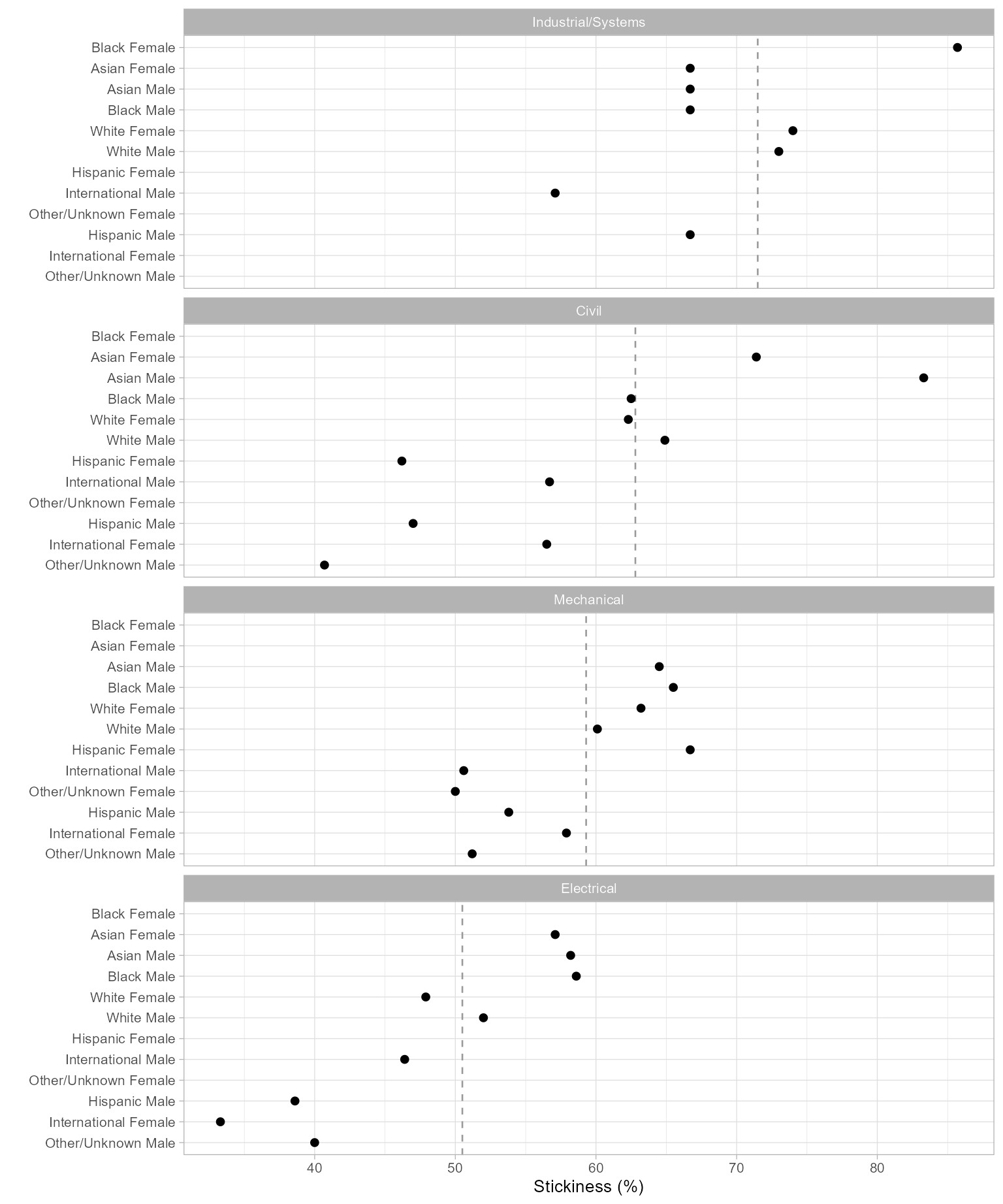
Figure 1: Program stickiness.
The vertical dashed line in each panel represents the overall stickiness of the program, calculated without regard to race/ethnicity and sex. The panels are ordered by those values, increasing from bottom to top. The stickiness of each “people” group, calculated without regard to program, determines the row order, also increasing from bottom to top.
In the next chart, we swap the roles of panels and rows.
ggplot(DT_chart, aes(x = stick, y = program)) +
  facet_wrap(vars(people),
    ncol = 2,
    as.table = FALSE
  ) +
  geom_vline(aes(xintercept = people_metric),
    linetype = 2,
    color = "gray60"
  ) +
  geom_point(size = 1.8, na.rm = TRUE) +
  labs(x = "Stickiness (%)", y = "") +
  theme_light(base_size = 10)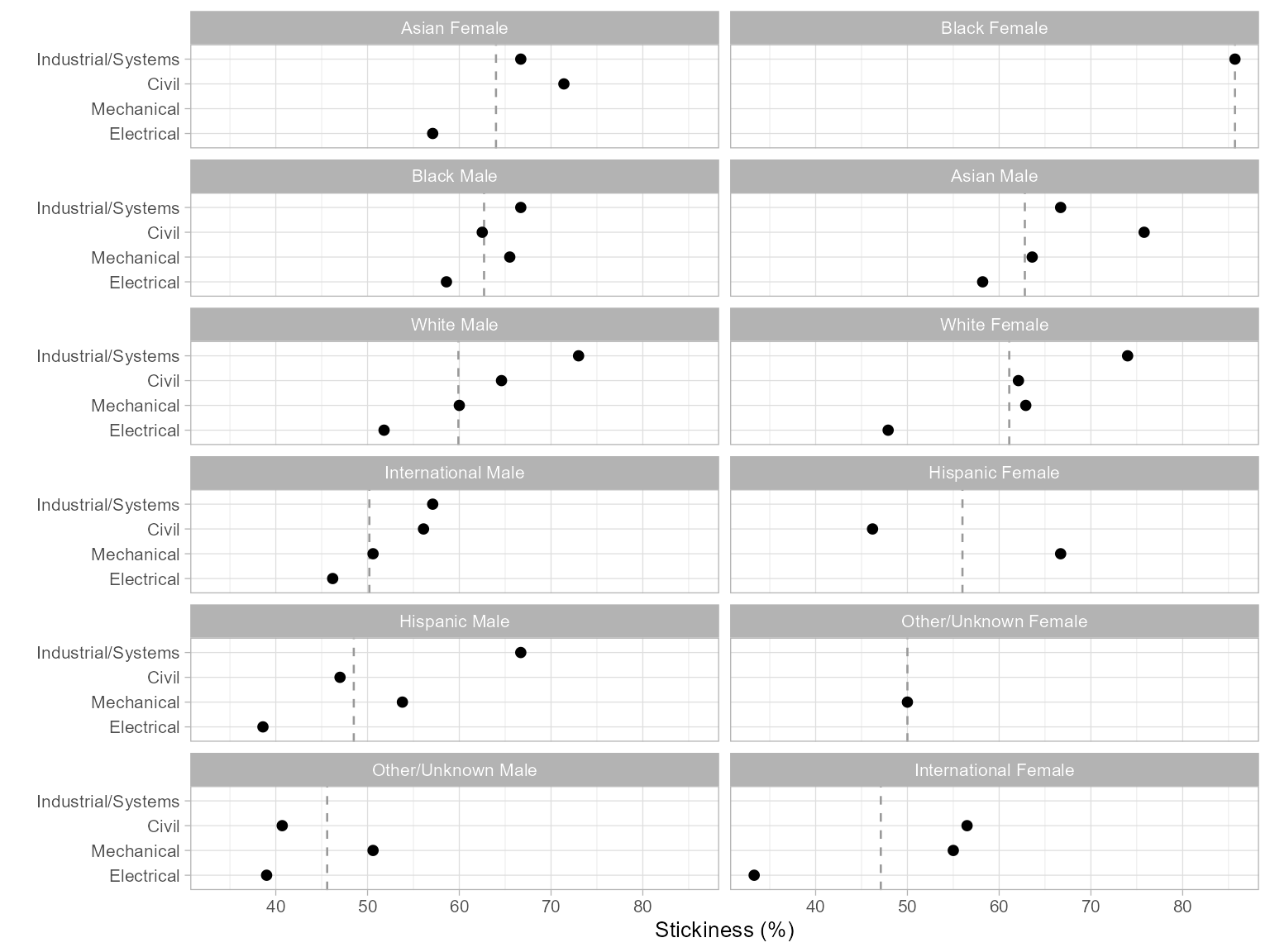
Figure 2: Program stickiness.
In this version, the vertical dashed line in each panel represents the overall stickiness of the people group, calculated without regard to program. Panels are ordered by increasing group stickiness from left to right and from bottom to top.
Summary
We have presented a complete study, from a sample of registrar’s data to charts comparing a quantitative metric, illustrating how we use midfieldr and other R packages to work with longitudinal student records.
Please note however that the data in midfielddata are for practice, not research. These results cannot be used for drawing inferences about people or programs.